
Reolink Duo 2 PoE vs. Duo 3 PoE: What's the Difference?
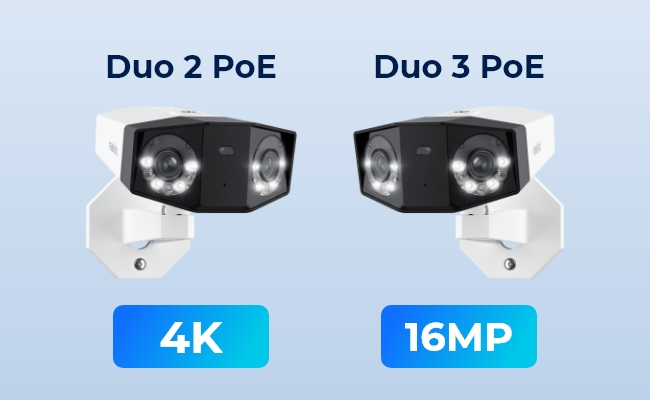
The Reolink Duo 2 PoE and Reolink Duo 3 PoE both use a dual-lens design to stitch two lenses into one 180° panoramic view, but here's the real question:
If you already own a Duo 2 PoE, is the Duo 3 PoE's jump to 16MP worth the switch.
This guide is written for anyone who is picking between the two for a new install, and any current owners of the Duo 2 PoE owners considering if the upgrade pays off. We compare resolution, field of view, smart detection, power draw, and more so you can see exactly what changed.
TLDR: If you need to zoom in on distant detail across a wide driveway or yard, the Duo 3 PoE earns its price. If your current setup already covers what you need, there's no rush to switch.
Reolink Duo 2 PoE vs. Duo 3 PoE: Comparison Table
Prices change frequently with promotions. Check the live product pages above rather than relying on a fixed number here. Specs verified against reolink.live's live product pages as of August 2026.
What Is the Reolink Duo 2 PoE?

The Reolink Duo 2 PoE stitches two 4K lenses into one seamless 180° panoramic view, so one camera covers what would normally need two. It runs on Power over Ethernet, so a single cable handles both power and data.
Great News: We've extended Motion Track and animal detection to the Duo 2 PoE through firmware updates since launch, so it now shares the same smart detection stack as the newer Duo 3 PoE.
- 4K UHD resolution (4608×1728, 8MP combined)
- Sharp enough to identify faces and vehicles at typical yard and driveway distances.
- 180° horizontal, 60° vertical field of view
- Covers a full driveway or front yard from one mounting point, no second camera needed.
- Person, vehicle, and animal detection with Motion Track
- Cuts down false alerts from blowing leaves or passing shadows, and lets you review a whole event in one image instead of a full clip.
- IEEE 802.3af PoE, draws under 15W
- Runs on the same cable as your network connection, no separate outlet needed at the mounting spot.
- microSD storage up to 512GB, plus NVR and Reolink Home Hub support
- Store footage locally with no subscription, or fold it into an NVR or Home Hub setup you already run.

As one verified buyer, Billy, put it in a review on reolink.live: "This camera is an interesting one. It isn't for everyone, but its unique set of features might be a good one. We had the previous 2K WiFi version and this one is a fantastic upgrade." He uses it to cover a driveway package-delivery area, running independent motion alerts on each lens with one tuned sensitive for the delivery spot, and one less sensitive for the general yard. This further proves the versatility of the Duo 2 PoE it's designed for users who are looking to use it for scenarios as such.
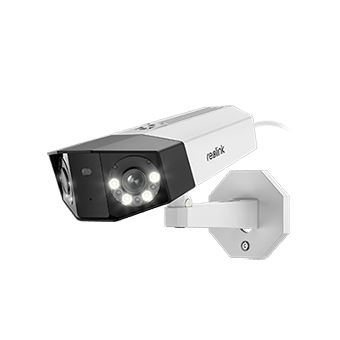
Smart 4K Dual-Lens PoE Camera
4K 8MP Super HD, Dual-Lens, Person/Vehicle Detection, 180° Wide Viewing Angle, Power over Ethernet, Color & Infrared Night Vision.
What Is the Reolink Duo 3 PoE?
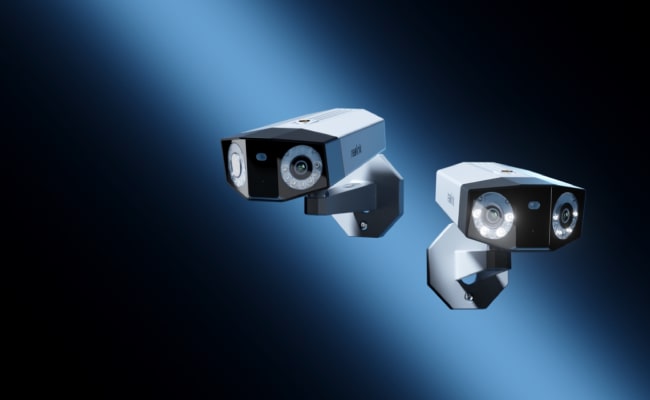
The Reolink Duo 3 PoE is our highest-resolution dual-lens PoE camera, combining two lenses into a single 16MP, 180° panoramic frame. It's built for properties where you need to zoom into fine detail, like a face at the gate or a plate on a car in the driveway, without losing wide-angle coverage. It uses the same one-cable PoE setup as the Duo 2 PoE but draws less power despite the resolution jump.
- 16MP UHD resolution (7680×2160)
- Enough detail to zoom into a face or plate after the fact, not just view it live.
- 180° horizontal, 55° vertical field of view
- Same wide horizontal coverage as the Duo 2 PoE, with a slightly tighter vertical angle worth checking against your mounting height.
- f/1.6 aperture lens for better low-light detail than the Duo 2 PoE's f/2.0
- Gathers more light after dark, so color night vision holds up better in a dim driveway or garage.
- IEEE 802.3af PoE, draws under 12W
- Lower power draw than the Duo 2 PoE despite the higher resolution, easier on a shared PoE switch budget.
- microSD storage up to 512GB, plus Reolink NVR support
- Store footage locally with no subscription, or expand into an NVR for longer retention.

Another verified buyer, KimchiGUN, positively quoted on reolink.live: "Coming from someone who has fairly decent professional and personal experience with cameras. This cam is ranks up there." He runs it mounted about 15 feet up over his driveway, streaming full time to a Synology NAS over ONVIF RTSP while also using the Reolink app for quick checks, and calls the night vision, color performance, and motion detection all strong. Once again, this is another testament to how the Duo series, particularly the Reolink Duo 3 PoE, is able to adapt to multiple scenarios and deliver the results users expect.
Reolink Duo 2 PoE vs. Duo 3 PoE: Main Differences
Which Security Camera Has Sharper Video Detail?
The Duo 3 PoE captures 16MP total across its two lenses, roughly double the Duo 2 PoE's 8MP.
Each Duo 2 PoE lens contributes about 4MP to its stitched frame while each Duo 3 PoE lens contributes about 8MP. That's the number that actually matters for zoom because the resolution jump shows up most when you zoom into one spot (like a face or a car plate), rather than in the wide overview shot. Neither camera has an optical zoom lens, so this per-lens resolution is the hard ceiling on how much detail you can pull out of a digitally zoomed crop later.
Verdict: for zooming into distant detail, the Duo 3 PoE wins. For a simple wide overview at a lower price, the Duo 2 PoE still holds up.
Which Security Camera Has the Wider Field of View?
Both cameras cover the same 180° horizontally. Vertically, the Duo 2 PoE covers 60° and the Duo 3 PoE covers 55°, a small difference worth knowing before you mount either one.
Pro Tip: Keep gutters, eaves, and roof overhangs out of frame when angling the Duo 3 PoE. Its stitched 180° view makes reflective surfaces close to the lens more noticeable at night with the spotlight on.
Verdict: if you're replacing a single narrow-FOV camera and expect the same vertical reach at 16MP, check your mounting height first. If you're covering a wide driveway or yard where horizontal coverage matters most, this trade-off rarely shows up as a problem in daily use.
Which Security Camera Has Smarter Detection Features?
Both cameras now detect people, vehicles, and animals. Both cameras also support Motion Track, Reolink's proprietary feature that condenses a subject's movement path into a single image.
Verdict: On smart detection alone, the Duo 2 PoE is capable of providing the exact same function as the Duo 3 PoE today. However, the resolution and field of view are what actually separate them now.
Which Uses Less Power?
The Duo 2 PoE draws under 15W; the Duo 3 PoE draws under 12W despite its higher resolution. Both run on the IEEE 802.3af PoE standard, so if you're running several cameras off one PoE switch, check its total power budget before adding more (our PoE switch guide walks through how to calculate that).
Verdict: the Duo 3 PoE is the more power-efficient of the two, one more point in its favor if you're upgrading.
Reolink Duo 2 PoE vs. Duo 3 PoE: Which Should You Choose?
The right choice depends on your setup and what you're already running.
Pros and Cons
Reolink Duo 2 PoE
Pros:
- Lower price than the Duo 3 PoE (successor)
- Slightly wider 60° vertical field of view
Cons:
- Half the per-lens resolution, so zoomed-in crops hold noticeably less detail
- f/2.0 lens gathers less light in very low conditions than the Duo 3 PoE's f/1.6
Reolink Duo 3 PoE
Pros:
- Double the resolution (16MP total), for sharper zoomed-in detail on faces and plates
- Brighter f/1.6 lens for better low-light performance
- Lower power draw (under 12W) despite capturing double the resolution
Cons:
- Narrower 55° vertical field of view
- Some older Reolink NVR models may not support full 16MP recording, as documented in our official review
Both cameras skip mandatory subscriptions as they store footage locally on a microSD card or through a Reolink NVR.
FAQs
What's the main difference between Reolink Duo 2 PoE and Duo 3 PoE?
The main difference is resolution. The Duo 2 PoE captures 8MP (4608×1728) across its two lenses. The Duo 3 PoE captures 16MP (7680×2160). Both cover 180° horizontally, though the Duo 3 PoE has a slightly narrower 55° vertical field of view versus the Duo 2 PoE's 60°. Smart detection and Motion Track are now identical on both.
Is the Reolink Duo series compatible with Reolink NVRs?
Yes. Most cameras in the Duo series work with Reolink PoE NVRs like the RLN8-410 for expanded storage and centralized recording. If you're still deciding whether an NVR is worth adding, our NVR buying guide covers what to look for. Check our support pages for the full compatible NVR list before pairing.
Does the Duo 3 PoE work with older Reolink NVRs?
Mostly, yes, but some older NVR models may not support full 16MP recording from the Duo 3 PoE. If you're adding a Duo 3 PoE to an existing NVR setup, confirm your NVR model supports 16MP channels first, or record locally to a microSD card instead.
How much power does the Reolink Duo 2 PoE use?
The Duo 2 PoE draws under 15W over a standard IEEE 802.3af PoE connection. The newer Duo 3 PoE draws less, under 12W, despite capturing double the resolution. If you're running several PoE cameras off one switch, factor this into your switch's total power budget.
What's the difference between the Duo 3 PoE and the V versions?
The Duo 3V PoE and Duo 2V PoE are dome-style, IK10 vandal-proof versions of the Duo 3 PoE and Duo 2 PoE. The difference is housing and mounting, not core imaging: the Duo 3V PoE still records at 16MP, while the Duo 2V PoE matches the Duo 2 PoE's 8MP. Pick a vandal-proof V model if the install location sees vandalism risk or needs ceiling mounting.
Can I upgrade from Duo 2 PoE to Duo 3 PoE without rewiring?
In most cases, yes. Both cameras share the same 195×103×56mm housing and mounting bracket, confirmed on the Duo 2 PoE and Duo 3 PoE spec sheets, and both use the same single-cable PoE setup, so your existing Ethernet run and mount will generally carry over. It's still worth confirming your PoE switch or injector can supply enough power during the swap.
Conclusion
If you're deciding between these two, the real question isn't which camera is "better," it's how often you actually zoom into your footage. The Duo 3 PoE earns its keep the moment you need to pull a face or a plate out of a wide shot, thanks to that extra resolution and the brighter f/1.6 lens, and it somehow does that while pulling less power than the camera it replaces. The narrower vertical view is worth a glance at your mounting height before you commit, but it rarely changes the outcome for driveway or yard coverage. If your Duo 2 PoE already covers what you need, there's no reason to rush the swap. Check current pricing and specs on the Duo 3 PoE to consider if it's the camera you need!
Search
Subscribe for the Latest Updates
Security insights & offers right into your inbox