
Wireless Security Camera Systems with Remote Viewing (No Subscription 2026 Guide)
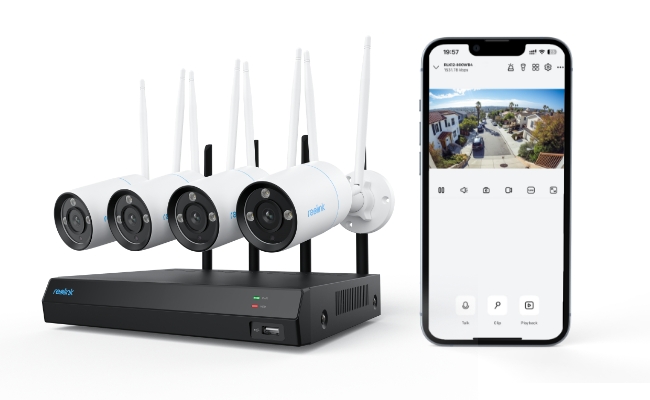
A wireless security camera system with remote viewing lets you monitor live and recorded footage of your home or office directly from your smartphone, tablet, or PC. Because these systems run on Wi-Fi or cellular networks, they offer flexible placement without the hassle of running video cables.
Finding the right setup comes down to your space, power preferences, and network setup. Below, we break down how wireless systems work, compare key camera types, highlight essential buying factors, and walk you through setting up remote viewing step by step.
- What Is a Wireless Security Camera System with Remote Viewing?
- What Are Common Types of Remote-Viewing Wireless Security Camera Systems?
- Why Use a Wireless System with Remote Viewing?
- 5 Key Features to Look for in the Best Wireless Security Camera System with Remote Viewing
- Best Wireless Security Camera Systems with Remote Viewing for Different Setup
- How to Set Up Remote Viewing for a Wireless Security Camera System
- Real-World Feedback on Wireless Security Camera System for Remote Viewing
- FAQs
- Conclusion
What Is a Wireless Security Camera System with Remote Viewing?
A wireless security camera system with remote viewing is a surveillance setup that transmits video data over Wi-Fi or cellular networks instead of physical video cables. It connects to an internet router or hub, allowing you to watch live feeds, review recorded footage, and manage settings directly from a smartphone, tablet, or PC from anywhere in the world.
How Wireless Remote Viewing Works?
Unlike traditional CCTV systems that require coaxial or Ethernet lines fished through walls back to a central monitor, a wireless system relies on over-the-air data transmission.
Here is how the core setup functions in real-time:
-
Video Capture: The camera records high-definition video (such as 2K or 4K resolution).
-
Wireless Data Transmission: The camera sends encoded video data over a wireless frequency—typically 2.4 GHz, 5 GHz dual-band Wi-Fi, or cellular LTE—to your local network router or a centralized base station (like an NVR or Home Hub).
-
Cloud or Local Storage: Footage is saved either locally (on a microSD card, hard drive, or NVR) or uploaded to cloud storage.
-
P2P Remote Access: When you open the companion app on your phone, a secure Peer-to-Peer (P2P) connection retrieves the stream, delivering live video and instant activity alerts straight to your screen without requiring complex network configuration.
Understanding "Wireless": Data vs. Power
A common point of confusion for buyers is what "wireless" actually refers to for a remote-viewing camera system:
-
Wireless Data Transmission: Every "wireless camera" sends its video feed wirelessly over Wi-Fi or cellular networks.
-
Power Source (Plug-In vs. Wire-Free):
-
Plug-In Wireless Cameras: Wireless for networking, but require a power cable plugged into an AC outlet nearby. These are ideal for continuous 24/7 recording.
-
Wire-Free (Battery/Solar) Cameras: Completely cable-free, running on rechargeable batteries or solar panels. These are best for motion-triggered events and locations where running power cords is impossible.
-
What Are Common Types of Remote-Viewing Wireless Security Camera Systems?
Wireless security camera systems with remote viewing fall into two primary categories based on location and functional design: indoor systems for interior monitoring and outdoor systems built for perimeter defense. Choosing between them depends on power accessibility, weatherproofing needs, and the specific area you need to monitor.
1. Wireless Indoor Security Camera Systems
Indoor wireless security cameras are compact, plug-in or battery-powered devices designed to monitor interior spaces over Wi-Fi. They give you instant live access to check on family, pets, or property from your smartphone or desktop without running network cables through walls.
Indoor systems emphasize short-range convenience, audio communication, and smart tracking rather than weather resistance.
-
Two-Way Audio: Built-in microphones and speakers allow real-time conversation, making them ideal for checking in on kids after school or telling a pet to get off the furniture.
-
Pan-Tilt & Auto-Tracking: Many indoor models feature motorized rotation to eliminate blind spots, automatically panning to follow movement across a living room or nursery.
-
Privacy Controls: Physical privacy shutters or customizable schedule modes let you disable recording automatically when you arrive home.
-
Smart Motion Alerts: AI detection notifies you of human presence or baby cries, minimizing false alarms triggered by shifting ambient light or shadows.
2. Wireless Outdoor Security Camera Systems
Outdoor wireless security cameras feature weatherproof housing and enhanced night vision to monitor perimeters, driveways, and entry points. They transmit footage via Wi-Fi or cellular networks, delivering real-time activity alerts directly to your phone regardless of weather conditions.
Outdoor systems focus on environmental durability and active crime deterrence.
-
Weatherproof Ratings (IP65/IP66/IP67): An IP66 or IP67 rating ensures the housing is completely sealed against heavy rain, snow, dust, and temperature extremes, allowing the camera to operate year-round.
-
Advanced Night Vision: Infrared night vision captures clear black-and-white footage in complete darkness. Enhanced color night vision uses ambient light sensors or built-in spotlights to deliver full-color video down to low lux levels, making it easier to identify vehicle colors or clothing details.
-
AI Person & Vehicle Detection: Advanced algorithms distinguish humans and cars from wind-blown foliage or small animals, preventing false push notifications.
-
Active Deterrence: Built-in motion spotlights and sirens trigger automatically when an intruder is detected to deter crime before it happens.
Why Use a Wireless System with Remote Viewing?
A wireless security camera system with remote viewing combines cable-free setup with real-time property access. By transmitting video over Wi-Fi, these systems eliminate complex network wiring while allowing you to monitor live feeds, receive Instant alerts, and review footage from anywhere via your phone or PC.
1. Hassle-Free, DIY Installation
Unlike traditional wired systems that require fishing network cables through walls or ceilings, wireless cameras send data over Wi-Fi.
2. Real-Time Remote Access Anywhere, Anytime
Remote viewing transforms your security system from a passive recorder into an active monitoring tool. Monitor your front porch, office floor, or backyard from anywhere with internet connectivity.
3. Smart Automation & Instant Protection
Modern wireless systems offer advanced software features designed to keep you informed without overwhelming you with notifications. For example, you will receive immediate push notifications on your phone only when motion is detected.
Pro Tip: If you want a completely wire-free setup, consider battery- or solar-powered wireless cameras, which eliminate the power cord entirely for maximum flexibility.
5 Key Features to Look for in the Best Wireless Security Camera System with Remote Viewing
Choosing the best wireless security camera system comes down to evaluating core features against your property's specific needs. Focus on these five critical criteria before making a purchase:
1. Subscription-Free Remote Viewing App
A high-quality security system should include a intuitive, multi-platform app for iOS, Android, macOS, and Windows that enables remote viewing without forced monthly fees.
While basic remote access is standard across most brands, software policies vary significantly:
-
Cross-Device Support: Ensure the app allows smooth live previews, multi-channel viewing, and playback on both mobile devices and desktop computers.
-
Watch Out for Subscription Traps: Some manufacturers gate essential features—like remote live streaming, motion alerts, or video playback—behind monthly paywalls. Look for systems that offer full app functionality for free.
For example, Reolink systems provide full remote access, live preview, and instant alerts through the Reolink App/Client with zero subscription fees.
2. Video Resolution (2K vs. 4K)
Higher video resolution provides finer detail and allows you to zoom in on critical features like face details or license plates without pixelation.
-
2K (4MP/5MP): The baseline standard for indoor rooms or compact entryways. Offers clear image clarity while keeping file sizes manageable.
-
4K (8MP or Higher): Essential for outdoor spaces, long driveways, or large open yards where capturing far-away details is critical.
Higher resolution requires more local storage and higher Wi-Fi bandwidth. If you choose a 4K system, ensure your network and local storage setup (microSD card or NVR) can handle the larger file throughput.
3. Advanced Night Vision Capabilities
Night vision ensures 24/7 security coverage. Choosing between Infrared (IR) and Color Night Vision depends on how much ambient light your property has after dark.
-
Infrared (IR) Night Vision: Uses invisible IR LEDs to produce clear black-and-white video in total darkness. Ideal for dark side-yards or completely unlit areas.
-
Color Night Vision: Uses low-light sensors or integrated spotlights to capture full-color video at night. Color details—like the color of an intruder's clothing or a vehicle—provide crucial evidence for law enforcement.
4. Dual-Band Wi-Fi & Modern Wireless Standards (Wi-Fi 6)
Smooth, buffer-free remote viewing requires a stable wireless connection. Look for cameras with dual-band Wi-Fi support (2.4 GHz / 5 GHz) or Wi-Fi 6 technology.
-
2.4 GHz vs. 5 GHz Dual-Band: 2.4 GHz offers longer signal range through walls, while 5 GHz delivers faster data transmission for high-resolution 4K streams. Dual-band cameras automatically select the best frequency.
-
Wi-Fi 6 Integration: Newer Wi-Fi 6 cameras deliver better range, higher bandwidth, and reduced interference—ensuring stable remote live streams even across multi-camera setups.
5. Clear Two-Way Audio
Two-way audio uses a built-in microphone and speaker to transform your remote viewing camera into an interactive communication tool.
-
Interactive Convenience: Talk directly to delivery drivers, welcome visitors, or check in on family members straight from your smartphone.
-
Crime Prevention: Speak up in real-time to warn off trespassers or porch pirates before they cause damage.
Best Wireless Security Camera Systems with Remote Viewing for Different Setup
Selecting the best outdoor wireless security camera system with remote viewing depends on your property layout, available power sources, and storage preferences. Below are top-performing configurations tailored to specific real-world security needs.
1. Best for Multi-Zone Coverage & Continuous Recording: Reolink RLK12-800WB4
The RLK12-800WB4 is a high-performance 4K Wi-Fi 6 NVR system engineered for 24/7 continuous outdoor surveillance across large properties with zero subscription fees.
You need multi-angle 24/7 monitoring for a large house, detached garage, or small business layout without running video cables or paying monthly cloud subscriptions.
Key Features & Benefits:
- Ultra-HD 4K & Color Night Vision: Delivers crystal-clear 4K resolution and full-color night footage to accurately identify critical details like facial features or vehicle license plates remotely.
- Dual-Band Wi-Fi 6: Utilizes modern Wi-Fi 6 technology to reduce signal interference, ensuring smooth, low-latency 4K remote live previews on your phone or PC.
- IP67 Weatherproof: Heavy-duty, IP67-rated camera housing ensures reliable operation in heavy rain, snow, and extreme temperatures.
- Centralized 2TB NVR Storage: The included Wi-Fi NVR comes with a pre-installed 2TB hard drive and supports up to 12 cameras, offering secure, subscription-free local recording and remote management.
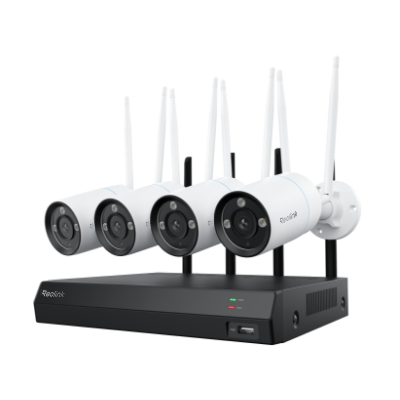
4K Security Kit with Next-Gen WiFi 6
4 pcs 4K Ultra HD Security Cameras; Dual-Band WiFi 6; 2TB HDD 12-Channel NVR for 24/7 Recording; Peron/Vehicle/Animal Detection; IP67 Weatherproof.
2. Best Wire-Free & Wide-Angle Coverage: Reolink Home Hub with Argus 4 Pro
Combining the Argus 4 Pro with the Reolink Home Hub offers a solar powered wireless security camera system with remote viewing that delivers 180° blindspot-free 4K coverage.
You need perimeter or front-yard surveillance in areas where outlets are unavailable, and you want broad area coverage without mounting multiple individual cameras.
Key Features & Benefits:
-
180° Dual-Lens View: Seamlessly stitches footage from two 4K lenses into a continuous 180° field of view, replacing the need for multiple single-lens cameras to eliminate blind spots.
-
Continuous Solar Power: Paired with the Reolink Solar Panel 2, this wire-free system stays powered year-round without requiring manual battery removal or recharging cycles.
-
ColorX Night Vision: Features an f/1.0 aperture and 1/1.8" sensor to capture vivid, full-color footage in low-light environments without blasting bright white LEDs.
-
Home Hub Local Storage: Wirelessly connects battery cameras to a centralized Home Hub with expandable local storage, keeping your remote feeds encrypted and subscription-free.
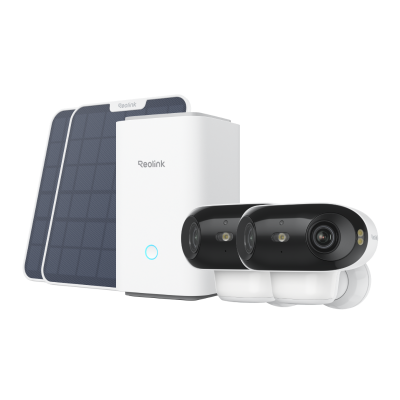
4K UHD Wi-Fi 6 Security System with 180° Blindspot-Free View
ColorX Night Vision, 1 Year of Local Storage, Exclusive Anti-Theft Algorithms, 180° Blindspot-Free Coverage, Expandable System Up to 8 Reolink Cams.
How to Set Up Remote Viewing for a Wireless Security Camera System
Enabling remote viewing on a wireless security camera takes under five minutes. Most modern systems connect via a UID code, letting you stream live video and receive instant alerts directly on your smartphone or desktop without complex router configurations.
Step 1: Download the Companion App or Software
Download the official client application from the App Store, Google Play, or the manufacturer’s website.
-
For Mobile: Install the application on your iOS or Android smartphone.
-
For Desktop: Install the desktop client on your Windows PC or Mac.
Step 2: Add Your Camera via UID or QR Code
Launch the application and add your device:
- Tap the "+" (Add) button in the app.
- Scan the QR code located on the side or bottom of your camera or NVR. Alternatively, enter the unique UID (Unique Identifier) manually.
- Follow the on-screen prompts to connect the camera to your local 2.4 GHz or 5 GHz Wi-Fi network.
Step 3: Create a Secure Password & Start Remote Viewing
Set up account security and begin monitoring:
- Create a strong admin password to secure your camera’s live feed.
- Select your camera from the device list to instantly stream live HD footage, access two-way audio, and configure push notifications.
Real-World Feedback on Wireless Security Camera System for Remote Viewing
Homeowners on Reddit consistently say that reliable remote viewing is one of the most important features when choosing a wireless security camera system. Across the discussions, users prioritized systems that let them quickly check live video from anywhere without requiring complicated network configuration.
Why Reolink Is a Good Fit for Remote Viewing?
If you're looking for a wireless security camera system for remote viewing, reolink.livebines the features Reddit users value most:
-
View live video anytime through the Reolink App, Client, or web browser.
-
Receive person, vehicle, animal, and package detection alerts in real time.
-
Store footage locally on microSD cards (up to 512GB on supported models), Reolink Home Hub, or an NVR without mandatory monthly fees.
-
Choose battery-powered Wi-Fi cameras for flexible installation or wired/NVR systems for 24/7 continuous recording and more dependable remote monitoring.

FAQs
Can CCTV be viewed remotely?
Yes. Most modern CCTV and wireless security camera systems support remote viewing through a mobile app, desktop client, or web browser. As long as the camera or NVR is connected to the internet, you can watch live video, receive motion alerts, and review recordings from anywhere.
Which is the best wireless security camera system with remote viewing?
The best wireless security camera system with remote viewing depends on your needs. Look for features such as high-resolution video, reliable Wi-Fi, smart person/vehicle detection, local storage, and an easy-to-use app.
For homeowners, Reolink is a strong choice. It offers 2K to 4K video quality, free remote viewing through the Reolink App, AI motion detection, local storage with no mandatory monthly subscription, and support for battery-powered, Wi-Fi, and NVR-based camera systems.
Can wireless security cameras work without the internet?
No, wireless security cameras require Wi-Fi to transmit data and provide access. However, there are standalone cameras that work using 4G. You need to insert a SIM card with a data plan for internet connection.
Conclusion
A wireless security camera system with remote viewing is ideal for 24/7 surveillance. You can check the live preview from anywhere and keep an eye on your house or office. You can secure the vicinity and record all the movements and activities of days, weeks, and months in the NVR. While choosing a wireless security camera system, you can consider the factors and features we have mentioned. These will help you choose the best camera system for your needs.
Search
Subscribe for the Latest Updates
Security insights & offers right into your inbox