
USPS Says Delivered But No Package? Here’s What to Do Next
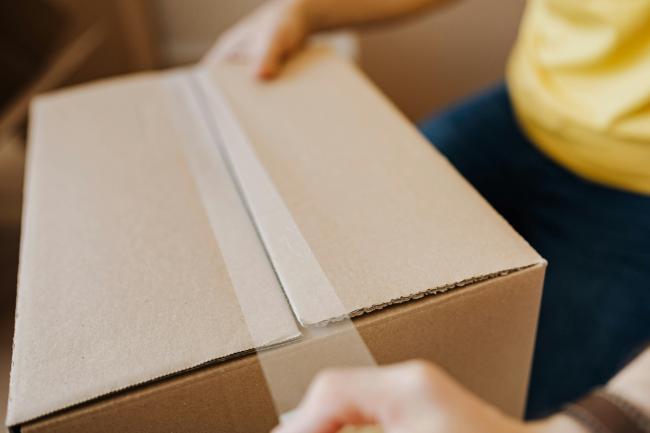
When USPS marks a package as "Delivered" but it isn't on your porch, it is usually due to an early carrier scan, a parcel tucked in a hidden spot, or a minor drop-off delay.
Seeing a "Delivered" status when your doorstep is empty is frustrating for any online shopper. Whether your tracking update says USPS package says delivered but not here or USPS delivered to wrong address, panic isn't necessary. While postal tracking technology has improved, logistics glitches still happen.
This guide breaks down why these mis-scans occur, provides a step-by-step recovery plan, and covers long-term habits to keep your porch secure.
- Why Does My Package Say Delivered But Not Here?
- What to Do If USPS Tracking Says Delivered But No Package Arrived
- How to Contact USPS When Your Package Is Delivered But Not Received
- How to Prevent USPS Tracking & Missing Package Issues in the Future
- Proactive Protection: How Reolink Security Cameras & Doorbells Prevent Mail Loss
- FAQs
- Conclusion
Why Does My Package Say Delivered But Not Here?
A "Delivered" tracking update with no parcel in sight usually stems from early carrier scans, hidden drop-off spots, or temporary system sync lags—meaning your package is often nearby or arriving shortly.
While logistics networks use handheld scanners to mark items complete at every stop, several common scenarios explain the gap between tracking data and reality
-
Early scan by the carrier: A driver sometimes scans every box at the start of the street to save time. The truck then follows the loop, and your parcel may still be two blocks away. Late-day traffic, gate codes, or weather can stretch that delay to several hours.
-
Package left in an alternate spot: The driver often tucks small boxes behind a planter, inside a grill, or under patio furniture to hide them from passers-by. A quick sweep of porches, carports, and side doors may reveal the item. Evening shadows make this search tricky, so use a flashlight if needed.
-
Delivery handed to a neighbor or front desk: If you live in an apartment, condo, or gated community, the carrier may leave the parcel with a staff member or a helpful neighbor when you are out. Buildings share this policy to cut repeat trips and prevent theft, yet staff may forget to notify you right away.
-
Mistake in apartment or unit number: A single digit off can send the box to a door on another floor. The incorrect resident sometimes keeps the item until asked, adding extra delay. Many units share similar door mats and décor, which adds to confusion for a substitute carrier.
-
System lag on the tracking site: Scans travel through several servers. The public page can post the “Delivered” status minutes or hours before the scan uploads from the handheld device. Cell dead zones or a drained battery on the scanner can stretch the gap even further.
-
Mis-typed scan event: A quick finger slip can mark the wrong bar code as delivered. The handheld device groups stop by sequence number, not address, so a mis-tap assigns your tracking number to the box meant for the next house. The carrier often notices the mismatch later and fixes it on the evening return, but the system has already pushed the “Delivered” note to your phone.
What to Do If USPS Tracking Says Delivered But No Package Arrived
If your USPS package is not delivered but says it was, systematically check physical drop zones, verify the shipping address, contact your local post office branch directly, and file an official Missing Mail Search.
Follow this 7-step plan to recover your missing parcel or secure a full refund:
Step 1: Search the Immediate Property Area
Conduct a thorough perimeter check around entryways, bushes, and side doors where carriers frequently conceal packages.
-
Walk your entire porch, garage side door, back gate, and patio.
-
Inspect behind large pots, outdoor décor, or bushes where small envelopes can easily slip.
-
Carriers hide packages to prevent theft, so a quick five-minute sweep uncovers most missing items.
Step 2: Verify the Shipping Address on Your Order
Check your shipping confirmation to ensure the seller printed your exact street address, unit number, and ZIP code.
-
Open your original order confirmation email.
-
Double-check for missing apartment digits or street typos.
-
If the seller printed an incorrect address, responsibility shifts to the merchant to replace or refund your order.
Step 3: Check with Household Members and Neighbors
Confirm whether someone else accepted or moved the delivery while you were away.
-
Ask family members, roommates, or property managers if they brought the parcel inside.
-
Send a quick text or post on a local neighborhood app (like Nextdoor).
-
Sharing a product photo gives neighbors an exact visual of what to look out for on shared porches.
Step 4: Contact Your Local Post Office Directly (Skip the 1-800 Line)
Call your local ZIP code branch to have a supervisor contact your route carrier in real time.
-
Look up the direct phone number for your local neighborhood branch.
-
Ask to speak with a supervisor and provide your tracking number.
-
Local supervisors can contact your carrier on the route by radio to verify GPS coordinates or schedule a second drop-off attempt before the van returns to the hub.
Step 5: Submit an Official USPS Missing Mail Search
File a formal trace online if your parcel remains missing after 24 hours.
-
Go to the official USPS website and initiate a Missing Mail Search request.
-
Provide sender details, receiver address, package dimensions, and estimated value.
-
Submitting this request triggers an automated search sweep across local sorting centers. Keep your confirmation email as proof of your timeline.
Step 6: Initiate an Insurance or Payment Protection Claim
Open a non-delivery case with the merchant, payment processor (e.g., PayPal), or shipping carrier.
-
If bought on a marketplace with buyer protection, open an "Item Not Received" dispute.
-
For insured USPS packages, the merchant typically files the claim and provides you with a replacement or refund.
-
Keep all order receipts, invoices, and tracking screenshots ready as supporting evidence.
Step 7: Escalate to USPS Consumer Affairs
Reach out to regional Consumer Affairs officers if local branches fail to resolve your missing package case.
-
Locate your regional Consumer Affairs office number on the official USPS website.
-
Provide your original Missing Mail case ID and request a formal review.
-
Regional officers oversee local branch performance and can grant goodwill resolutions for service failures.
How to Contact USPS When Your Package Is Delivered But Not Received
When dealing with USPS delivered but not received issues, contacting your local post office branch directly or calling official escalation lines yields significantly faster results than general customer support queues.
Reaching the right department speeds up your recovery. Use the contact channels and specific numbers below in the recommended order:
Recommended USPS Contact Channels & Phone Numbers
How to Prevent USPS Tracking & Missing Package Issues in the Future
Setting up automatic tracking alerts, establishing clear carrier delivery instructions, installing video surveillance, or utilizing USPS hold options can drastically reduce the risk of future package loss and false-delivery scares.
Taking a few proactive, low-cost steps protects your deliveries before the carrier even arrives:
-
Specify Custom Delivery Instructions: Use the free USPS Delivery Instructions tool online to specify a preferred drop zone—such as a side porch, back deck, or secure parcel locker. Carriers can view these instructions directly on their handheld scanners upon arrival.
-
Sign Up for USPS Informed Delivery: Activate Informed Delivery to receive daily email summaries containing preview photos of incoming mail and automated tracking notifications for arriving packages. This helps you spot missing scans early and plan to be home for high-value drops.
-
Request USPS Hold for Pickup on High-Value Orders: Choose the Hold for Pickup option on sensitive or expensive orders. The local post office branch holds the parcel behind the counter until you present a valid photo ID, bringing porch theft risk down to zero.
-
Track Deliveries via the USPS Mobile App: Download the official mobile app to receive real-time push notifications the moment a carrier updates a tracking status. Instant alerts allow you to meet the driver at your door or request a neighbor to secure the package immediately.
-
Rent a PO Box for Frequent High-Value Deliveries: If you regularly receive small electronics, jewelry, or collectibles, rent a local PO Box. Carriers place items inside secure, locked postal lockers at your local branch for easy, private pickup.
Proactive Protection: How Reolink Security Cameras & Doorbells Prevent Mail Loss
While tracking apps help you follow a package's journey, installing a dedicated smart security camera actively deters porch piracy and provides undeniable visual proof if a delivery goes missing.
Reolink's smart surveillance lineup is designed specifically to solve doorstep delivery disputes without forcing you into expensive monthly subscriptions:
-
Real-Time Package Detection: Reolink Video Doorbells use built-in AI algorithms to instantly recognize when a courier leaves a box on your porch, sending a dedicated "Package Detected" push alert to your smartphone.
-
24/7 Continuous Local Storage: Unlike standard battery cameras that take several seconds to wake up, Reolink PoE and hardwired systems record 24/7 continuous footage directly to a local NVR or microSD card. This gives you precise video evidence showing whether a carrier actually dropped off a parcel.
-
Head-to-Toe 2K/4K Views: With a 1:1 wide aspect ratio, Reolink doorbells capture full head-to-toe views, ensuring packages placed directly against your front door don't fall into a blind spot.
-
Active Deterrence & Two-Way Audio: Speak directly to delivery drivers or trigger built-in spotlights and sirens from the Reolink app to stop package theft in real time[cite: 1].
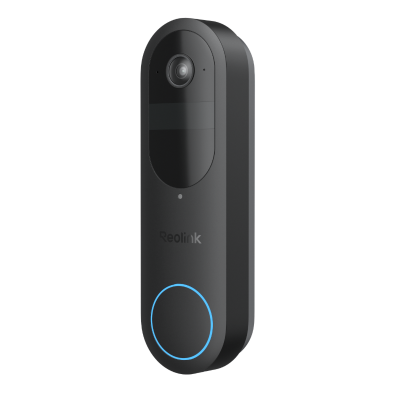
2K Battery Wi-Fi Video Doorbell with Smart Detection
- 2K 4MP Head-to-Toe View
- Person/Vehicle/Animal/Package Detection
- 300-Day Lasting Battery Life
- No Monthly Fees for Local Storage
FAQs
Why does my package say delivered but not here?
USPS scans parcels at delivery to close the job, but the driver might scan early or leave the box with a neighbor, building office, or hidden spot near your door. Weather delays, substitute carriers, and small parcels lodged in full mailboxes can also create a false delivered status for customers.
Who is responsible if the USPS loses a package?
The shipper is the first to share responsibility, as he or she selected the service and purchased any insurance. The buyer is required to request the sender to initiate a search, claim, or substitute item. In case the shipment was insured, the person sending the courier takes the money and refunds or repackages the shipment to the buyer immediately.
What do I do if my package says delivered but I never got it USPS?
Start with a detailed search around your entry, mailbox, and neighbors. Check USPS Informed Delivery images and review tracking scans. Contact the local Post Office directly, then file a missing mail request online. If no update appears within seven days, ask the sender for a replacement or claim the loss.
Conclusion
Missing parcels cause stress, yet most USPS package says delivered, but not here reports are resolved within a day. Check hiding spots, verify the label, and involve your local branch early. Use delivery instructions, video proof, and timely alerts to prevent repeats. Share your experience below so other readers can learn from your tactic.
Lost parcels still rank among the top questions that Customer Care receives each week. Follow the structured checklist to shorten the investigation and raise the chance of a refund when the item cannot be found. Practical habits such as video logs and scheduled pickups keep grief off your doorstep year-round.
Search
Subscribe for the Latest Updates
Security insights & offers right into your inbox