
Reolink TrackFlex Floodlight Wi-Fi Review
- What is the Reolink TrackFlex Floodlight WiFi Camera
- TrackFlex Floodlight WiFi Deep Dive: Feature-by-Feature Analysis
- How the TrackFlex Floodlight WiFi Compares with Other Reolink Security Cameras
- Which Reolink Floodlight Camera Should You Buy?
- How to Install and Set Up TrackFlex Floodlight Wi-Fi?
- What Reviewers Are Saying
- FAQs
- Verdict: Should You Buy TrackFlex Floodlight WiFi?
What is the Reolink TrackFlex Floodlight WiFi Camera
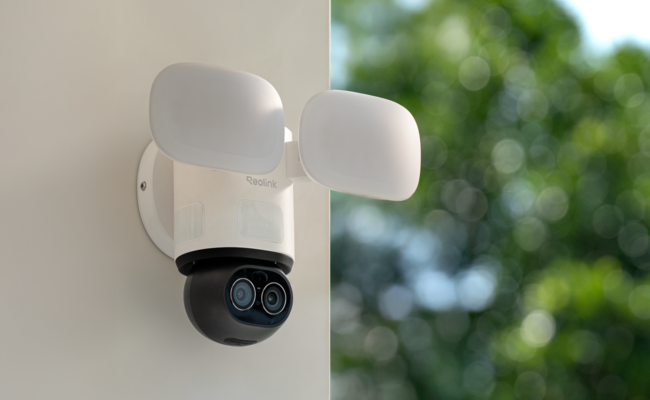
The TrackFlex Floodlight WiFi is a dual-lens, 360°-capable floodlight security camera that pairs a wide-angle lens with a 6× hybrid zoom telephoto lens, so it shows a full scene and a close-up at the same time. It's a hardwired camera so power runs through the mounting point via AC 100–240V. The box includes the camera, mounting plate, USB-C cable, and mounting screws. An AC cable can be provided through its alternate bundle offerings.
Key Specifications
Pros
- 355° pan and 50° tilt with 6× hybrid zoom: The camera delivers near-360° coverage from a single mounting point, cutting down on the multi-camera setups wraparound coverage usually requires
- Local, on-device AI Video Search: A technology powered by ReoNeura, the camera can find footage from a typed description, with no cloud subscription
- 3,000-lumen adjustable floodlight (3000K–6500K): The floodlights enable color night vision when active, not just infrared
- Triple PIR sensors: These sensors extend detection to a 270° out-of-view zone, so the camera can catch and swing toward motion outside its current field of view
- No recurring fees for local storage or AI search: The camera works with microSD (up to 512GB), Reolink NVR, Home Hub, or FTP/NAS
Cons
- No Apple HomeKit support
Best for: Homeowners with mains wiring or easy electrician access who need one hardwired camera to cover multiple angles. This could be covering the driveway, side gate, or front walkway via the 355°/50° PTZ range. Also suitable for anyone who require specific AI-powered person/vehicle/animal detection and search without a subscription fee.
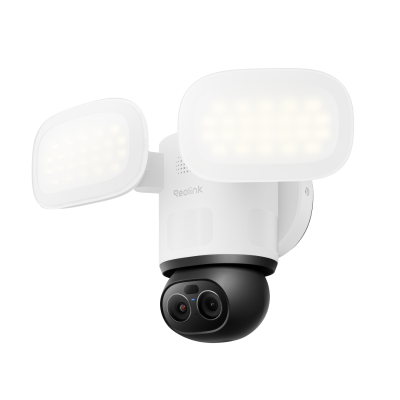
Smart 4K 360° Coverage Wi-Fi Floodlight Security Camera
Local AI Video Search, 4K 8MP Ultra HD, 360° Coverage View, 6X Hybrid Zoom, Dual-Color Floodlight.
TrackFlex Floodlight WiFi Deep Dive: Feature-by-Feature Analysis
Local AI Video Search

Instead of scrubbing through hours of clips, Reolink's TrackFlex Floodlight WiFi lets you search recorded footage by typing a description such as "person in a red jacket," for example. The search runs on-device rather than in the cloud. For a driveway or front-yard camera that's recording most of the day, this is the difference between finding one relevant clip in seconds versus reviewing an evening's worth of motion events by hand.
4K Dual-Lens Video

The wide-angle lens captures 4K (8MP) at 20fps for full-scene coverage, while the telephoto lens adds 6× hybrid zoom for close-up detail. Both footages captured are viewable at once in a split-screen view in the Reolink app.

An independent reviewer's hands on testing found the image quality "more than acceptable" at night with the floodlight active, with the expected falloff in detail at maximum zoom range once light drops. This is an industry-wide trade-off for all hybrid zoom cameras.

360° AI-Powered Tracking

With 355° pan and 50° tilt, The TrackFlex Floodlight WiFi auto-tracks people, vehicles, and animals across nearly the full circle around its mounting point, backed by 64 customizable preset positions for switching between key viewing angles with one tap.
270° Out-of-View Detection

Three built-in PIR sensors extend motion detection to 270° around the camera, well beyond what either lens can see at any given moment. When something triggers a sensor outside the current view, the camera pans and tilts toward it automatically. community feedback
highlights this as a standout feature precisely because most fixed or single-lens PTZ cameras miss activity that happens behind or beside their current view. The remaining 90° is a genuine blind spot. This is worth accounting for when deciding which direction the camera's back should face during mounting.
Pro Tip: Because the privacy mask and non-detection zone only apply to the camera's default guard position (not every angle it swings to during a 355° pan), test your zone settings after the camera completes a full pan cycle, not just at the initial view before finalizing placement.
Smart Floodlight & Color Night Vision

TrackFlex's two floodlight fixtures produce a combined 3,000 lumens, adjustable in brightness and color temperature (3000K warm to 6500K cool). This is confirmed as the total output by both Reolink's own spec sheet and How-To Geek's independently tested spec table. That output is also what enables TrackFlex's color night vision to produce colored footage when the floodlight is active rather than through a dedicated low-light color sensor. That's a meaningful distinction from Reolink cameras that use ColorX sensor technology to show color without supplemental lighting. For most driveway and entryway placements where motion-triggered lighting is already the point, this is a non-issue. This camera may not be suitable if you specifically want unlit color monitoring. The Reolink E1 Outdoor CX is a better fit as it uses Reolink's ColorX sensor (F1.0 aperture, 1/1.8" CMOS) to produce full-color night footage from ambient light alone in most settings, in the same 355°/50° pan-tilt, auto-tracking form factor.
Pro Tip: Wind-blown foliage and falling snow can repeatedly trigger motion alerts overnight, since PIR sensors respond to any heat/motion change in frame. This is not unique to the TrackFlex Floodlight WiFi camera, but worth planning for. If you're installing before winter, expect to lower motion sensitivity and revisit your non-detection zones after the first snowfall to prevent false alarms.
Flexible Storage
The Reolink Trackflex Floodlight WiFi is a totally subscription-free security camera. Footage can be saved locally to a microSD card (up to 512GB), a Reolink NVR (PoE or Wi-Fi models), a Reolink Home Hub or Home Hub Pro, or an FTP/NAS server. Even if the camera loses network connectivity, recording continues to the SD card, so a home Wi-Fi outage doesn't create a recording gap.
Dual-Band Wi-Fi 6
This security camera supports dual-band Wi-Fi 6 (2.4GHz/5GHz) which enables a stable 4K live view without the buffering that can affect older Wi-Fi standards on congested home networks. Bluetooth can also be used for initial setup pairing rather than a more involved manual network configuration.
How the TrackFlex Floodlight WiFi Compares with Other Reolink Security Cameras
The TrackFlex Floodlight WiFi and the Elite Floodlight WiFi are Reolink's two current hardwired 4K floodlight cameras, and they're frequently cross-shopped. The core difference is coverage shape. The former uses a 355°/50° PTZ range to actively track subjects around a wide arc, while the latter uses a fixed 180° panoramic lens with no moving parts.
Reolink TrackFlex vs Elite Floodlight
That fixed design is also why the Elite Floodlight WiFi includes AI-powered Perimeter Protection (line-crossing, zone-intrusion, and zone-loitering alerts) that isn't listed on TrackFlex's current spec sheet. If you've also looked at the smaller TrackMix WiFi, you should note that it trades the floodlight for a spotlight and has a narrower 90° tilt range at a lower price point.
Which Reolink Floodlight Camera Should You Buy?
Both cameras deliver 4K video and floodlight-assisted color night vision with no monthly fees. The right pick comes down to whether you need active tracking or a simpler fixed view. Here are a few scenarios we've thought of which could help you be clearer with what your ultimate choice should be.
How to Install and Set Up TrackFlex Floodlight Wi-Fi?
- Power the camera using a USB-C cable and a 5V/2A power adapter (it’s not included). Once the camera is powered, turn it on.
- Download the Reolink app and open it. Tap the “+” button at the top. Scan the QR code at the back of the camera.
- Complete the setup by following the on-screen instructions. Initialize your camera by setting the name and password. Install the microSD card on the device (optional).
- Disconnect the USB-C cable before installation. For safety, turn off the circuit breaker.
- Select a suitable location for the installation. Remove the mounting bracket. Secure the mounting plate on the wall using screws.
- Hang the camera on the mounting plate and connect the wires. Attach the camera to the mounting plate.
- Adjust the floodlight position. Everything is ready, and now, turn on the circuit breaker.
Pro Tip: Insert the microSD card before final mounting, as it's a much easier step to do on the ground than after the camera is live and tracking.
What Reviewers Are Saying
Major tech outlets have covered TrackFlex Floodlight WiFi since its release and it has been generally well-received:
"Reolink's latest Wi-Fi camera proves you don't need a subscription to achieve greatness" - How-To Geek
"I used Reolink's 360-degree outdoor camera for over four months, and it has everything I need in a security camera — it is a huge upgrade over my Nest Cam Outdoor, and it doesn't have a monthly fee" - Android Central
"Quality wise, the Reolink TrackFlex Floodlight WiFi lives up to expectations. Whether it is day time or night, it is providing the level of coverage I want for my property" - Digital Reviews Network
FAQs
Does TrackFlex Floodlight WiFi require hardwired installation?
Yes. TrackFlex runs on AC 100–240V hardwired power rather than a battery or PoE, so it's best installed by or with an electrician, particularly if you're replacing an existing wired fixture.
Does TrackFlex Floodlight WiFi's AI Video Search require a subscription?
No. AI Video Search runs on-device and works with local storage — there's no monthly fee for this feature or for standard recording and playback.
Is TrackFlex Floodlight WiFi compatible with Apple HomeKit?
Not currently. TrackFlex supports Alexa and Google Assistant; Apple HomeKit is not listed as supported at this time.
Does TrackFlex Floodlight WiFi work with the Reolink Home Hub?
Yes. It's compatible with both the standard Reolink Home Hub and Home Hub Pro for encrypted, centralized local storage, in addition to microSD, NVR, and FTP/NAS options.
How is TrackFlex Floodlight WiFi different from the Elite Floodlight WiFi?
TrackFlex uses a 355°/50° pan-tilt range to actively track subjects around a wide arc; Elite Floodlight WiFi uses a fixed 180° panoramic lens and adds Perimeter Protection alerts (line-crossing, zone-intrusion, zone-loitering) that aren't on TrackFlex's current spec sheet.
How do I connect a Reolink floodlight camera to WiFi?
Download the Reolink app, power on the camera, then tap "Add Device" and scan the QR code on the camera (or its packaging). Follow the in-app prompts to connect the camera to your 2.4GHz Wi-Fi network. Setup takes about 2-3 minutes.
Verdict: Should You Buy TrackFlex Floodlight WiFi?
Reolink's TrackFlex Floodlight WiFi earns its place if you need one hardwired camera to actively track motion across a wide, multi-angle property, without paying a subscription for AI search. If you'd rather have a simpler fixed view with Perimeter Protection alerts, the Elite Floodlight WiFi is the better fit within Reolink's own lineup. or, if you're budget-conscious and don't need the floodlight, the TrackMix WiFi delivers the same PTZ auto-tracking for less.
Keen to find out more about Reolink's TrackFlex Floodlight WiFi camera, check out current pricing and configurations on Reolink's TrackFlex Floodlight WiFi product page. Feel free to drop any questions you have in mind and we'll do our best to answer your queries!
Search
Subscribe for the Latest Updates
Security insights & offers right into your inbox