
Security Cameras with Push Notifications: Best Picks & FAQs
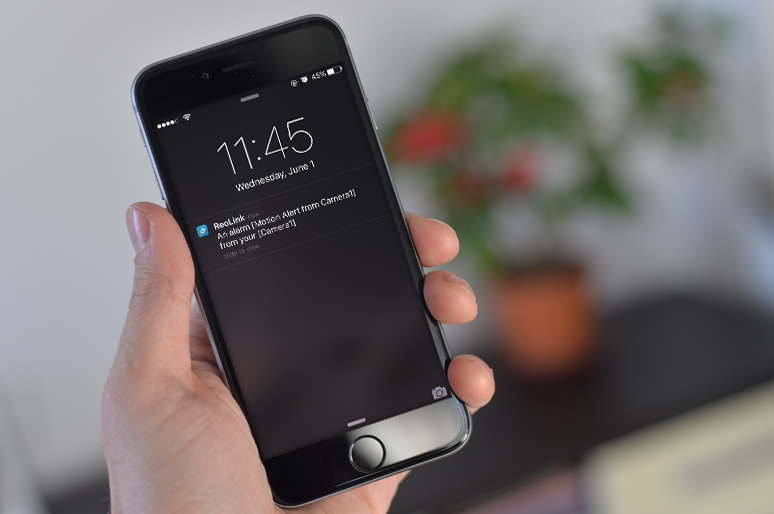
Want instant alerts when someone enters your property? A security camera with phone notifications can send real-time alerts directly to your smartphone when motion is detected.
Modern security cameras can notify you through push notifications, app alerts, or email, helping you quickly check whether the activity is a visitor, delivery, pet, or potential threat.
In this guide, we’ll explain how phone alert security cameras work, what features to look for, and the best Reolink cameras that send reliable mobile alerts.
- Do Security Cameras Alert Your Phone?
- What Are Common Types of Security Cameras with Push Notification?
- 4 Key Features to Look for in the Best Security Cameras with Push Notifications & Phone Alerts
- 3 Best Security Cameras that Alerts Your Phone for Different Household Needs
- How to Set Up Push Notifications for Security Cameras?
- Security Camera Notification Not Working? Pro Fixes
- Real-World User Feedback
- Buyer's Decision Table
- FAQs
- Conclusion
Do Security Cameras Alert Your Phone?
Yes, modern security cameras can send real-time motion alerts directly to your smartphone via push notifications, app alerts, or emails. The right setup allows you to immediately evaluate whether activity on your property is a package delivery, a family member, a pet, or a potential threat.
What Are Common Types of Security Cameras with Push Notification?
Motion-sensor security cameras that alert your phone come in five main types—Wi-Fi, PoE, battery, 4G LTE, and doorbell cameras. The right choice depends on your property’s power availability, internet connectivity, and mounting limits.
1. Wi-Fi Security Cameras
Plug-in Wi-Fi cameras connect wirelessly to your home router and provide instant app alerts with minimal setup required.
Best Used For: Indoor monitoring, front porches, or outdoor areas with nearby AC power outlets and strong Wi-Fi signal.
2. Power over Ethernet (PoE) Security Cameras
PoE cameras transmit power and network data through a single Ethernet cable, delivering maximum connection stability and reliable alerts.
Best Used For: Whole-home security, multi-camera NVR setups, and primary residences requiring 24/7 continuous recording.
3. Battery-Powered Security Cameras
Wire-free battery cameras offer flexible placement without drilling or running power cords, triggering instant alerts when motion is detected.
Best Used For: Apartment renters, temporary setups, or outdoor spots lacking electrical outlets.
4. 4G LTE Cellular Security Cameras
Cellular security cameras use mobile data networks instead of Wi-Fi to send phone alerts from remote off-grid locations.
Best Used For: Vacation homes, construction sites, farms, boats, or rural properties without internet access.
5. Video Doorbell Cameras
Doorbell cameras replace or supplement standard doorbells to notify you immediately when someone approaches your entryway or rings the bell.
Best Used For: Front entrance monitoring, managing package deliveries, and screening visitors remotely.
4 Key Features to Look for in the Best Security Cameras with Push Notifications & Phone Alerts
When choosing a security camera that sends real-time smartphone notifications, simple motion detection is not enough. To avoid notification fatigue while ensuring you never miss a real event, focus on these four essential features.
When choosing a security camera that sends real-time smartphone notifications, simple motion detection is not enough. To avoid notification fatigue while ensuring you never miss a real event, focus on these four essential features.
1. Two-Way Audio for Real-Time Interaction
Two-way audio allows you to speak and listen through your security camera in real time, serving as both a deterrent against intruders and a convenient tool for managing everyday visitors.
Once a push notification alerts you to movement on your property, integrated two-way audio lets you respond immediately:
-
Deter Burglars: Issue a direct verbal warning to deter potential trespassers the moment motion is detected.
-
Manage Deliveries & Visitors: Instruct delivery personnel where to leave packages, or address door-to-door visitors without physically opening the door.
What to look for: Evaluate the camera’s audio pickup quality, speaker volume output, background noise cancellation, and latency (delay) in live communication.
2. Smart AI Detection (Reducing False Alarms)
Advanced AI detection differentiates between people, vehicles, and pets, ensuring you only receive critical phone alerts instead of false alarms from wind or passing shadows.
The speed and accuracy of your phone alerts depend heavily on the underlying detection technology:
-
Pixel-Based Detection (Traditional): Triggers alerts by measuring pixel changes between video frames. Highly sensitive to blowing leaves, moving shadows, and insects.
-
PIR (Passive Infrared) Sensors: Common in battery-powered cameras to preserve battery life, PIR sensors detect changes in thermal radiation (body heat) rather than visual movement alone.
-
On-Device AI Algorithms: Analyzes shapes locally on the camera to identify specific targets—such as a person at your porch or a car in your driveway—before sending an alert.
Pro Tip: To eliminate unnecessary alerts, set up designated motion detection zones and adjust the motion sensitivity settings in low-traffic areas within your camera's field of view.
3. Custom Push Notification Controls
Flexible alert options let you tailor how and when your phone receives notifications, preventing constant interruptions throughout the day. A reliable mobile alert camera system should offer multiple, customizable alert channels:
-
Instant App Push Notifications: Immediate pop-up alerts delivered to your phone's lock screen.
-
Email Alerts with Snapshots: Instant emails attached with a photo frame or short video clip for quick review.
-
Scheduled Alert Profiles: Ability to mute notifications during specific hours (e.g., when you are at home) or increase sensitivity while you are away.
4. Intuitive Security Camera App
An easy-to-use mobile app ensures you can go from an incoming push alert to a crisp live video stream in seconds.
The mobile app is your primary interface for managing security alerts. A well-designed app provides:
-
Fast Live View: Opens instantly from a push notification so you can see live activity without delay.
-
Multi-Camera Management: Allows you to view live feeds from multiple indoor, outdoor, or doorbell cameras in a single screen.
-
Local Storage and Playback: Enables fast scrubbing through recorded event clips stored on a microSD card, NVR hard drive, or cloud storage.
Pro Tip: Systems designed around local storage—such as NVR setups or microSD card options available on Reolink cameras—allow you to access motion-triggered clips quickly via the app without paying recurring monthly subscription fees.
3 Best Security Cameras that Alerts Your Phone for Different Household Needs
There is no single "best" security camera for every home. The right choice depends on your installation limits, power availability, and whether you prefer wireless flexibility or continuous wired coverage. Below are three top scenario-based recommendations:
1. Best for Flexible Outdoor Placement & Wide Property Coverage: Reolink Argus 4 Pro
You want full coverage of a large outdoor area—such as a wide driveway, front yard, or patio—without running power cables or suffering from wide-angle blind spots.
Standard security cameras often have narrow fields of view, leaving blind spots that miss approaching visitors. Running power lines outdoors can also be difficult or impossible for renters and homeowners alike.
A wire-free, battery-powered camera equipped with a dual-lens 180° panoramic view covers wide perimeter areas in a single video stream. Combining solar panel charging with built-in PIR and AI motion sensing ensures continuous operation without high maintenance.
Recommended Setup: Reolink Argus 4 Pro
The Argus 4 Pro is ideal for wire-free perimeter monitoring. It features dual 4K lenses that stitch together a seamless 180° field of view, eliminating blind spots across large yards or driveways. Powered by a rechargeable battery with solar panel compatibility, it delivers instant phone alerts, motion-triggered spotlighting, and two-way audio for remote communication—all with no monthly subscription required.

4k 180° Wire-free Color Night Vision Camera
4K UHD 180° Blindspot-free View; Color Vision Day and Night; 30% More Battery Life; Dual-band Wi-Fi 6; Smart detection.
2. Best for Compact Spots & Entryway Monitoring: Reolink Lumus
You need a compact, low-maintenance outdoor camera near a porch, garage, or side entrance to deter unwanted visitors and manage package deliveries.
Battery cameras in high-traffic spots can suffer from battery drain, while basic pixel-detection cameras send frequent false notifications caused by shadow movements or insects.
Combining Passive Infrared (PIR) sensors with motion analysis significantly reduces false alerts while maintaining an instant response time. Continuous AC plug-in power ensures the camera is always ready.
Recommended Setup: Reolink Lumus
The Reolink Lumus is a versatile plug-in Wi-Fi camera designed for localized entryway monitoring. Utilizing a hybrid motion detection system (PIR thermal sensing combined with pixel detection), it filters out minor environmental distractions to deliver accurate phone alerts when actual activity occurs. It features a built-in spotlight for full-color night vision, local microSD card recording, and two-way audio to speak with visitors at your door.
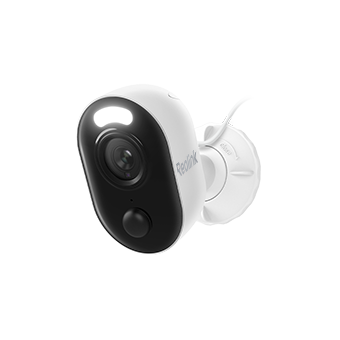
Outdoor WiFi Security Camera with Motion Spotlight
Bright, Motion-Activated LED Spotlight, Instant Siren Alarm, and Remote 2-Way Audio; 2K 4MP and Full Color Night Vision.
3. Best for 24/7 High-Detail Coverage & Sturdy Setup: Reolink RLC-810A
You are securing a primary residence or business and need reliable, ultra-clear 4K video recording around the clock with zero reliance on Wi-Fi stability.
Wi-Fi interference can cause missed phone alerts or dropped recordings, and lower-resolution cameras often fail to reveal distinct details like vehicle license plates or facial features.
Power over Ethernet (PoE) sends power and data through a single hardwired network cable for maximum connection reliability. Pairing this with 4K 8MP resolution ensures key details are clearly legible when an alert arrives.
Recommended Setup: Reolink RLC-810A
The Reolink RLC-810A is a heavy-duty PoE camera built for permanent high-security monitoring. Delivering crisp 4K (8MP) video, it includes on-device smart AI detection to distinguish people and vehicles, sending target-specific alerts directly to your mobile device. Its IP66 weatherproof housing handles harsh elements, while support for local NVR storage or microSD cards allows continuous 24/7 recording without subscription costs.
How to Set Up Push Notifications for Security Cameras?
Enabling push alerts requires three quick actions: installing the camera manufacturer’s official app, granting notification permissions in your phone's OS, and activating push alerts inside the app's settings.
Step 1: Install the Latest Security Camera App
Download and install the latest official camera app from the Apple App Store or Google Play Store. Keeping your app updated ensures compatibility with your phone's operating system and grants access to the latest smart detection features.
Step 2: Enable System Notification Permissions
When opening the app for the first time, your mobile operating system will ask for permission to send alerts.
-
On iOS (iPhone): Tap Allow when prompted for notifications. You can verify this anytime in
Settings>Notifications>[Camera App]> Toggle Allow Notifications ON. -
On Android: Tap Allow when prompted. Ensure battery-saver settings for the camera app are set to "Unrestricted" so background notifications are never delayed by your phone's power management system.
Step 3: Enable Push Alerts & Customize Detection in App Settings
Open the app, log into your camera system, and locate the device settings:
-
Find the Push Notifications or Alerts menu and toggle it ON.
-
Adjust Smart Detection Filters to specify whether you want alerts for all motion, or only for people, vehicles, or packages.
-
Set up a Notification Schedule if you only want alerts during specific hours (e.g., overnight or while you are away from home).
Troubleshooting Tip: If you are not receiving alerts, check that your phone is not in "Do Not Disturb" or "Focus Mode," and ensure background data refresh is enabled for the security app.
Check the example of Reolink App:
Security Camera Notification Not Working? Pro Fixes
Notification issues are usually caused by disabled permissions, aggressive phone battery-savers, network drops, or outdated firmware.
-
Check Notification Toggles: Ensure push alerts are turned ON in both the camera app and your phone’s system settings (
Settings>Notifications). -
Disable Battery Saver Modes: Set your phone’s battery optimization for the camera app to Unrestricted so background alerts aren't blocked.
-
Verify Internet Access: Confirm both your phone and camera have active data or Wi-Fi connections.
-
Reboot Your Router: Restart your Wi-Fi router to clear stalled connection routes to the push notification server.
-
Adjust Camera Placement: Don't point heat-sensing (PIR) cameras through glass windows, and keep wireless cameras within strong Wi-Fi range.
-
Update the Camera App: Download the latest app version from the App Store or Google Play Store to ensure OS compatibility.
-
Update Camera Firmware: Check the app settings and install any available firmware updates to fix system bugs.
-
Test on Another Phone: Log into your camera app on a second device to check if the issue is specific to your phone's settings.
Real-World User Feedback
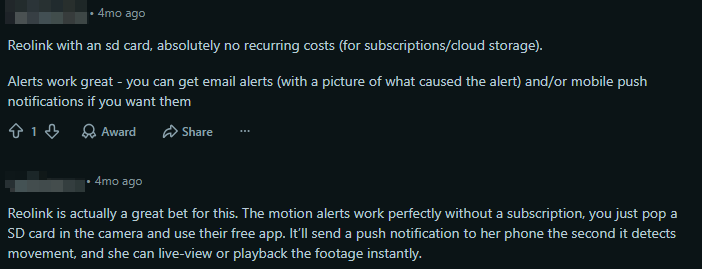
Based on real-world discussions in home security communities like r/homesecurity and r/SecurityCamera, users consistently prioritize subscription-free local storage, instant remote app access, and customizable alert methods over flashy extra features.
Reliable notifications are critical. Users look for systems that allow fallback alert methods—such as combining app push notifications with automated email alerts or localized siren triggers—to ensure critical events are never missed. Many users mention Reolink as a solid choice.
Buyer's Decision Table
FAQs
What are push notifications on a security camera?
Push notifications are instant alerts sent to your phone when a security camera detects activity, such as motion, a person, vehicle, or package. You can tap the alert to open the camera app and check live video or recorded footage.
What are the downsides of push notifications?
Common drawbacks include:
- Too many alerts from false triggers like pets, weather, or moving objects.
- Missed or delayed alerts due to weak WiFi, phone settings, or app issues.
- Battery drain on wireless cameras with frequent notifications.
AI detection and customizable motion zones can help reduce unnecessary alerts.
Can I get a motion sensor that notifies me?
Yes. Many smart motion sensors and security cameras can send phone alerts when movement is detected. For better accuracy, choose a system with person, vehicle, or animal detection instead of basic motion detection.
Which security camera systems include mobile alerts?
Most modern security camera systems support mobile alerts, including WiFi cameras, PoE NVR systems, battery cameras, and 4G LTE cameras. For example, Reolink cameras send real-time app notifications and support smart detection, local storage, and remote viewing without requiring a subscription.
Conclusion
A CCTV camera with push notifications and remote viewing helps you stay informed wherever you are. You can quickly check whether an alert is caused by a false alarm, such as a pet or moving object, or a real security event. With the right camera featuring smart detection and reliable mobile alerts, you can reduce unnecessary notifications and improve your home security.
Search
Subscribe for the Latest Updates
Security insights & offers right into your inbox