
Doorbell Camera with Monitor: Ultimate Guide
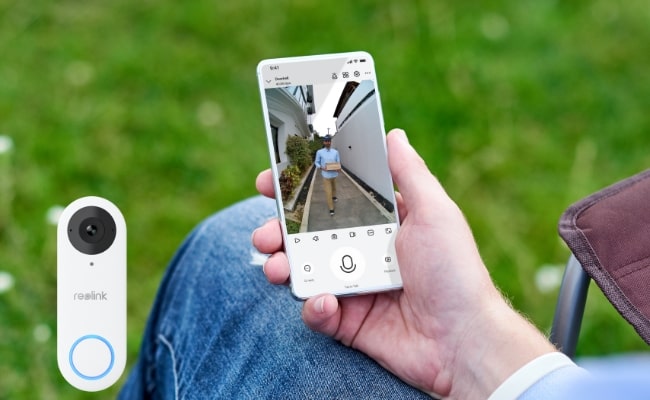
A video doorbell connected to a monitor screen is the best way to upgrade home security and convenience. Door monitoring, at its best, allows you to see who is at your door in real-time.
In this all-inclusive guide, we will teach you everything about smart doorbell cameras with monitor connections. Ultimately, you will be able to decide on the ideal combination of a camera doorbell and monitor that matches your unique requirements and budgetary constraints. One of the wisest home security investments is upgrading to a camera doorbell with monitor.
Key Takeaways:
- A doorbell camera with a monitor lets you view live video on devices such as a smartphone, tablet, smart display, Home Hub, or NVR monitor.
- Wired doorbell cameras are best for 24/7 recording, while battery-powered models offer easier installation and greater flexibility.
- Choose a monitor based on your needs: smartphones for remote access, smart displays for hands-free viewing, and NVRs for multi-camera monitoring.
- What is a Doorbell Camera with Monitor?
- Why Need a Doorbell with Camera and Monitor?
- How to Choose the Best Doorbell Camera with Monitor
- Replacement Options for Video Doorbell with Monitor
- Best Wireless Doorbell Camera Compatible with Monitor
- Which Doorbell Camera and Monitor Setup Is Right for You?
- FAQs
- Conclusion
What is a Doorbell Camera with Monitor?
A doorbell camera with monitor is a security camera that replaces your existing wired or wireless doorbell and connects to a compatible display screen for real-time monitoring.
When a visitor presses the doorbell button or triggers the motion sensor, you instantly receive a mobile alert and can view the live video feed on your connected monitor screen - whether it's a smartphone, tablet, computer, smart display, or standalone security monitor.
There are two main types of video doorbells that work with monitors:
- Wireless doorbell cameras - These convenient systems run off rechargeable batteries or existing doorbell wiring. They connect via WiFi to allow streaming to mobile devices and compatible monitors. No central installation is required!
- Wired doorbell cameras - These hardwired systems connect directly to your existing doorbell wiring for a continuous power supply. They can integrate with wired monitor displays and home security systems for uninterrupted real-time monitoring.
Why Need a Doorbell with Camera and Monitor?
There are many excellent reasons to upgrade your doorbell to a front door camera with monitor:
- Real-time monitoring - View your front door on-demand at any time on a monitor strategically placed in your home. See visitors arriving before you open the door for added security.
- Two-way communication - Speak directly with guests via the doorbell camera's built-in microphone and speaker. No need to go to the door.
- Person detection - Advanced doorbell cameras can detect people and send custom alerts when someone approaches your home.
- Package and delivery monitoring - Never miss a package again! Doorbell cameras record any time deliveries are left at your door.
- Deter theft - Visible security cameras are proven to deter criminals from targeting homes. Doorbell cameras add a noticeable layer of security.
Types of Doorbell Camera Monitors
How to Choose the Best Doorbell Camera with Monitor
With many options on the market, it can be tricky to select the correct video doorbell with monitor setup. Here are some key factors to consider:
Wired vs Battery
Choose a wired doorbell camera if you want continuous power, reliable 24/7 recording, and minimal maintenance. A battery-powered model is better for renters or homes without existing doorbell wiring, offering a quicker and more flexible installation but requiring periodic recharging.
Monitor Type
Consider how you want to view your doorbell feed. Smartphones and tablets provide remote access anywhere, while smart displays offer hands-free viewing inside the home. If you want to monitor multiple cameras or enable continuous recording, an NVR or Home Hub is the better choice.
Local vs Cloud Storage
Storage determines how your recordings are saved. Local storage, such as a microSD card, Home Hub, or NVR, keeps footage on your own devices without monthly fees. Cloud storage lets you access recordings from anywhere but often requires an ongoing subscription.
Continuous Recording
Not all video doorbells support 24/7 recording. Most battery-powered models record only when motion is detected to conserve power, while wired doorbells connected to an NVR or compatible recorder can typically provide continuous recording for complete front-door coverage.
AI Detection
Look for AI-powered detection features that can distinguish between people, vehicles, animals, and packages. Intelligent detection reduces false alerts caused by rain, moving branches, or passing vehicles, making notifications more accurate and useful.
Smart Home Compatibility
If you already use a smart home ecosystem, choose a doorbell camera that works with platforms such as Amazon Alexa or Google Home. This allows you to view live video on smart displays, use voice commands, and integrate the doorbell with other smart devices.
Installation Difficulty
Installation requirements vary depending on the model. Battery-powered doorbells are generally the easiest to install and require little more than mounting the device and connecting it to WiFi. Wired models may require existing doorbell wiring or a compatible power supply but provide a more permanent solution with continuous power.
Replacement Options for Video Doorbell with Monitor
If a dedicated doorbell camera and monitor isn't right for you, consider these alternative options:
Doorbell Cameras that Work with Google Home/Amazon Alexa
Many popular smart doorbells integrate with Google Nest displays and Amazon Echo Shows. When the doorbell is pressed, the live feed pops up on the smart display so you can see and talk to visitors hands-free.
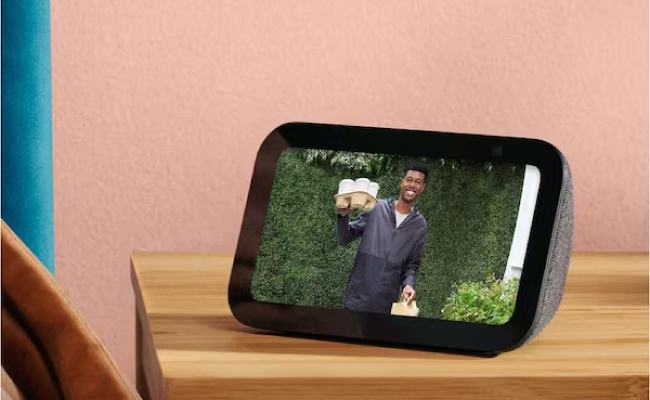
Video Doorbells Connected to Smartphone/iPad/PC/NVR
Standalone security cameras and video doorbells can stream real-time video to smartphones, tablets, computers, and NVRs using WiFi, and your phones or tablets can be seen as monitors. Just mount the camera outside your door and view the footage on your preferred device.
Best Wireless Doorbell Camera Compatible with Monitor
If you're looking for a smart video doorbell that works seamlessly with different monitor types, the Reolink Video Doorbell (2nd Gen) is an excellent choice. It delivers 2K HDR video, AI-powered detection, flexible storage options, and broad compatibility with smart devices, making it an ideal solution for modern homes.
Why Choose Reolink Video Doorbell (2nd Gen)?
- Works with Reolink Home Hub for centralized monitoring and local storage.
- Supports smartphones and tablets for live viewing and remote access through the Reolink App.
- Compatible with Google Home for hands-free monitoring on supported smart displays.
- Works with Amazon Alexa for voice control and live video streaming.
- Supports local storage via microSD card or Reolink Home Hub with no monthly subscription required.
- AI-powered package, person, vehicle, and animal detection for more accurate alerts.
- 2K HDR head-to-toe view to clearly see visitors and delivered packages.
- Battery or wired installation options to fit different homes and installation needs.
- Two-way audio and instant motion alerts so you can communicate with visitors from anywhere.
Whether you prefer viewing your front door on your phone while away, a smart display in your home, or a Home Hub for managing multiple cameras, the Reolink Video Doorbell (2nd Gen) provides a flexible, subscription-free monitoring experience.
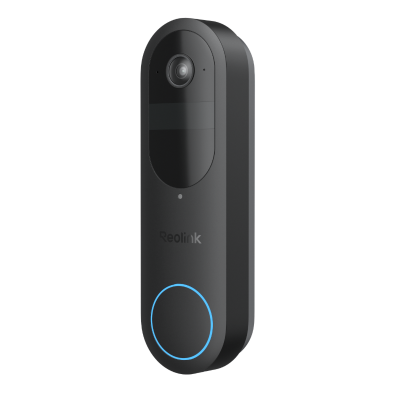
2K Battery Wi-Fi Video Doorbell with Smart Detection
- 2K 4MP Head-to-Toe View
- Person/Vehicle/Animal/Package Detection
- 300-Day Lasting Battery Life
- No Monthly Fees for Local Storage
Which Doorbell Camera and Monitor Setup Is Right for You?
FAQs
Does a doorbell camera record all the time?
Most doorbell cameras only record when motion is detected or the doorbell is pressed. Footage can be stored locally on an SD card or in the cloud with a subscription service. Hardwired models often support continuous recording.
Is there a doorbell camera that doesn't require internet?
Some wireless doorbell cameras can record to an SD card and connect directly to a monitor via WiFi without needing an internet connection. However, internet access is required for remote streaming and smart home connectivity.
Is there a monitor that works with doorbell cameras?
Yes, doorbell cameras are specifically designed to pair with monitors like smartphones, tablets, smart displays, NVRs, and smart home hubs. The doorbell streams live video to the monitor when the button is pressed, or motion is detected.
What is a doorbell with camera that records?
A doorbell with a camera that records is a smart video doorbell that captures and stores video when motion is detected, the doorbell is pressed, or continuously on supported wired models. Recordings can be saved locally on a microSD card, or NVR, or stored in the cloud.
Does every smart doorbell need a monitor?
No. Most smart doorbells work with a smartphone app, so a separate monitor isn't required. However, you can also connect compatible devices such as a tablet, smart display, Home Hub, or NVR monitor for a larger and more convenient viewing experience.
Conclusion
Convenience and security can be achieved by mounting a doorbell camera with an appropriate monitor. This way, you will be able to see and communicate with people coming to your door without necessarily leaving your couch.
With the help of such smart features as person detection or package monitoring, you will always keep abreast of the goings-on just near your home. Just ensure that you select the right type of wired or wireless doorbell cameras and monitors, depending on your preferences. Thus, a video doorbell with a monitor enables one to watch their front door from any point they are situated at.
Search
Subscribe for the Latest Updates
Security insights & offers right into your inbox