
Best Business Security Cameras: Complete Buyer's Guide (2026)

The best business security cameras offer continuous 24/7 recording, wide-angle coverage, and local storage to protect commercial spaces without costly subscription fees.
To help you protect your business, we evaluated the top business security cameras for both small shops and enterprise facilities. Read on to compare wired, wireless, and internet-free options, alongside key installation tips for IP camera deployment.
- Why Business Needs a Security Camera?
- What Are Common Types of Security Cameras for Business?
- 7 Key Features to Look for in the Best Business Security Camera
- 5 Business Security Cameras & Systems by Use Case
- Business Security Camera & System: Installation, Placement and Costs
- What Business Owners Need Most from Security Cameras and Systems? (Real-World Insights from Reddit)
- Business Security Camera & System Buyer’s Decision Table
- FAQs
- Conclusion
Why Business Needs a Security Camera?
Installing business security cameras is a strategic investment that reduces financial losses, protects against legal liabilities, and improves daily operations. Far beyond simple crime deterrence, modern surveillance systems deliver measurable return on investment (ROI) by safeguarding assets, employees, and profitability.
1. Significant Loss Prevention & Crime Deterrence
Visible, commercial-grade security cameras serve as a powerful primary deterrent against external threats—such as shoplifting, break-ins, and property vandalism.
2. Liability Protection & Fraud Defense
Frivolous lawsuits and fraudulent workers' compensation claims are major unexpected expenses for physical businesses.
High-definition, time-stamped video footage provides objective, indisputable evidence during legal investigations. This eliminates reliance on conflicting witness accounts, allowing owners to resolve "slip-and-fall" claims quickly and protect their legal standing.
3. Lower Insurance Premiums
Because video surveillance measurably lowers a property's risk profile, many commercial insurance providers offer discounted policy premiums for facilities equipped with continuous recording systems. Over time, these recurring insurance savings help offset the initial hardware investment.
4. Operational Visibility & Staff Management
Modern security cameras act as an operational oversight tool rather than just a security measure. Reviewing footage allows management to spot floor bottlenecks, optimize customer flow, and refine product placement.
5. Multi-Site Remote Management
For owners running multiple stores, offices, or remote locations, modern network systems enable centralized command. Using a mobile app, desktop dashboard, or centralized NVR, managers can check in on live operations, verify deliveries, and receive real-time motion alerts from anywhere.
What Are Common Types of Security Cameras for Business?
Types of Business Security Cameras
-
Dome Cameras: Best for indoor areas such as shops, offices, and lobbies. Their compact, vandal-resistant design is discreet and durable.
-
Bullet Cameras: Ideal for parking lots, driveways, and building exteriors. They offer visible deterrence, long-range viewing, and weather resistance.
-
PTZ Cameras: Suitable for large yards, warehouses, and construction sites. They can pan, tilt, zoom, and track movement.
-
Dual-Lens Cameras: Best for wide areas such as storefronts and parking lots. They provide a panoramic view with fewer blind spots.
-
Solar and 4G Cameras: Designed for remote locations without power or Wi-Fi, including farms, construction sites, and storage yards.
Types of Business Security Systems
-
PoE NVR Systems: Use Ethernet cables for both power and data. They are ideal for reliable 24/7 recording in offices, warehouses, and factories.
-
Wireless NVR Systems: Connect cameras over Wi-Fi, making them easier to install in small shops, rented spaces, or finished interiors.
-
Analog DVR Systems: Use existing coaxial cables and are a cost-effective option for upgrading older CCTV installations.
-
Multi-Site Systems: Combine local recorders with centralized management, allowing businesses to monitor several locations from one dashboard.
7 Key Features to Look for in the Best Business Security Camera
Selecting the right security camera for business requires balancing image clarity, night vision range, storage architecture, and legal compliance. Unlike home setups, business deployment must account for high foot traffic, large footprints, and multi-channel data management.
Before investing, evaluate these seven core technical criteria to ensure long-term coverage and reliability:
1. Coverage Area & Site Layout
Your property layout dictates camera density, lens focal length, and placement architecture. Mapping your coverage area prevents broad blind spots and stops you from over-purchasing hardware.
-
Indoor Retail & Offices: Focus on entry/exit points, POS cash registers, and high-foot-traffic aisles.
-
Large Footprints & Exteriors: Open warehouses, parking lots, and loading docks benefit from wide-angle or dual-lens panoramic cameras (180° FOV) to cover maximum ground with fewer physical devices.
2. Legal & Regulatory Compliance
Business surveillance systems must strictly adhere to regional privacy laws, employee monitoring regulations, and audio recording statutes. Non-compliance can lead to hefty fines and render your footage inadmissible in court.
-
Privacy Zones: Avoid pointing cameras toward private areas (restrooms, employee breakrooms, or neighboring properties).
-
Audio Recording Laws: Many jurisdictions require explicit consent or visible signage for audio capturing.
-
Data Protection Standards: Ensure recorded video is encrypted during transfer and local storage to prevent data breaches.
3. Video Resolution (1080p vs. 2K vs. 4K)
Higher resolution delivers critical visual detail—such as activities, license plates, and cash transaction specifics—over longer distances.
-
1080p (Full HD): Sufficient for small, enclosed indoor spaces or simple monitoring.
-
2K (4MP / 5MP): The ideal mid-range standard for entryways, hallways, and customer counters.
-
4K (8MP / 12MP): Essential for expansive parking lots, large retail floors, and detailed zoom capability without pixelation.
Note: Higher resolution increases file size. Ensure your NVR hard drive or storage plan has the capacity to handle multi-stream 4K continuous recording.
4. Night Vision Performance & Sensor Quality
Commercial cameras must capture actionable detail in total darkness or low-light exterior environments.
Standard Infrared (IR) night vision produces black-and-white footage in complete darkness using built-in LEDs. Advanced low-lux color night vision (such as 0.001 lux rating with large image sensors) captures full-color video in near-total darkness, preserving vehicle colors and clothing detail during night incidents.
5. Storage Options: Local NVR vs. Cloud
Businesses must balance bandwidth consumption, security preferences, and long-term costs when choosing storage.
-
Local NVR / NAS Storage: The gold standard for business. Features high-capacity hard drives, zero monthly fees, continuous 24/7 recording, and local privacy.
-
MicroSD Cards: Best for standalone or backup storage, but limited in capacity.
-
Cloud Storage: Enables convenient remote backups from anywhere, but requires stable upload bandwidth and incurs recurring monthly subscription fees per camera.
6. Network Connectivity
Choose a connectivity type that matches your site’s internet reliability and power accessibility.
-
Power over Ethernet (PoE): Transmits both data and power through a single network cable. Highly reliable, stable, and preferred for multi-camera business systems.
-
Dual-Band Wi-Fi (2.4GHz / 5GHz): Flexible, wire-free setup for leased spaces or locations where running Ethernet cables is difficult.
-
Cellular (4G/5G LTE): Designed for off-grid sites, construction yards, or remote land without fixed Wi-Fi or wired internet.
7. Total Cost of Ownership (TCO) & Scalability
Evaluate the full lifetime cost of your system, not just the initial camera price tag.
-
Subscription Fees: Cloud-based commercial systems can add thousands in annual operational costs. Prioritize local NVR setups to keep ongoing costs at zero.
-
System Scalability: Choose an NVR hub with extra available channels (e.g., an 8-channel or 16-channel unit) so you can easily add more cameras as your business expands.
5 Business Security Cameras & Systems by Use Case
Selecting a business camera system depends on your facility size, connectivity options, and power infrastructure. Below are scenario-based recommendations tailored to common business environments, ranging from single-room retail shops to off-grid yards and large industrial warehouses.
1. Best Wireless Outdoor Camera: Reolink Altas PT Ultra
Ideal for commercial perimeters, entryways, and leased properties requiring wire-free 4K coverage.
Wireless outdoor battery cameras often suffer from missed events due to motion-trigger delays. The Altas PT Ultra solves this with an industrial 20,000 mAh battery that enables 10-second pre-recording, capturing crucial footage before a PIR sensor triggers an alert.
Key Commercial Features:
-
4K UHD & ColorX Night Vision: Uses an ultra-large 1/1.8" sensor and F/1.0 aperture to capture full-color night video in ambient light without invasive floodlights.
-
360° Pan-Tilt Coverage: Offers 355° pan and 90° tilt with automatic tracking for people, vehicles, and animals.
-
Power Capacity: Operates for up to 500 days in PIR mode or pairs with a 6W solar panel for continuous charging.
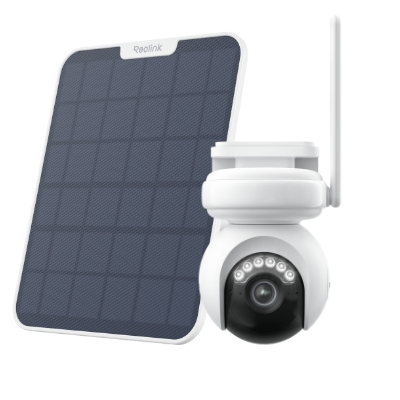
4K Battery-Powered PTZ Camera with Continuous Recording
👍 4K UHD video with continuous recording
👍 ColorX night vision in low light
👍 Pan, tilt, and automatic person tracking
👍 Local storage without monthly fees
2. Best Small Business & Indoor Camera: Reolink E1 Zoom
Ideal for retail counters, indoor sales floors, and office reception desks requiring compact, detailed monitoring.
Small businesses require high optical detail around cash registers and entryways without cluttering the interior space. The E1 Zoom offers an unobtrusive desktop or ceiling-mount design powered by a constant plug-in connection.
Key Commercial Features:
-
5MP Super HD & 3x Optical Zoom: Allows managers to digitally or optically zoom in on transaction details or customer interactions without loss of clarity.
-
Flexible Pan & Tilt: Features 355° pan and 50° tilt to cover entire indoor spaces with a single device.
-
Dual-Band Wi-Fi: Operates on both 2.4GHz and 5GHz Wi-Fi frequencies for minimal network interference.

PTZ Wireless Smart Home Camera
Smart, Powerful and Affordable All-Round Home Protection. 355° Pan and 50° Tilt; 4K Ultra HD, 3X Optical Zoom, Two-Way Audio, 2.4/5 GHz WiFi, with Google Assistant Integration.
3. Best Off-Grid & Cellular Camera: Reolink Go PT Ultra
Ideal for construction sites, remote storage yards, farms, and properties without Wi-Fi or fixed power.
Securing remote business assets often fails due to a lack of local internet. The Go PT Ultra operates independently using 4G LTE cellular networks, streaming video directly to your mobile app.
Key Commercial Features:
-
4K Ultra HD over LTE: Captures fine details across off-grid job sites in full 8MP resolution.
-
Battery & Solar Powered: Pairs a rechargeable battery with a weather-resistant solar panel for maintenance-free remote surveillance.
-
Pan, Tilt, & Local Storage: Rotates 355° horizontally to monitor open perimeter fences and stores clips locally on a MicroSD card to avoid cloud dependency.
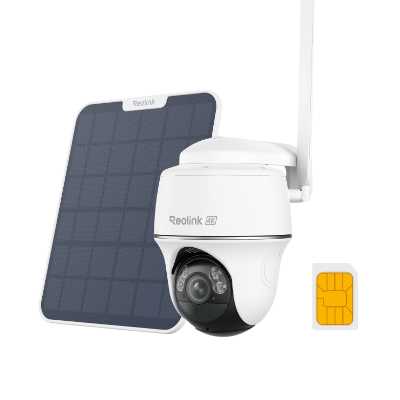
4K 8MP Wire-Free 4G LTE PT Battery Camera
4K 8MP; Smart Detection; 355° Pan & 140° Tilt; Battery/Solar Powered; Color Night Vision; Smart Real-Time Alert.
4. Best Mid-Size 4K System: Reolink RLK8-800B4
Ideal for multi-room offices, small warehouses, and restaurants needing continuous, centralized 24/7 local recording.
Mid-sized commercial setups need non-stop recording across multiple angles without overwhelming local Wi-Fi bandwidth. This Power over Ethernet (PoE) system delivers power and high-speed data over a single network cable per camera.
Key Commercial Features:
-
Plug-and-Play PoE Cabling: Supports cable runs up to 330 feet (100m) per camera using standard Ethernet cables.
-
8-Channel NVR with 2TB HDD: Pre-installed hard drive handles 24/7 continuous local recording for four included 4K bullet cameras, expandable up to 8 channels.
-
Rugged IP67 Housing: Weatherproof metal camera housings withstand harsh indoor or outdoor environments.
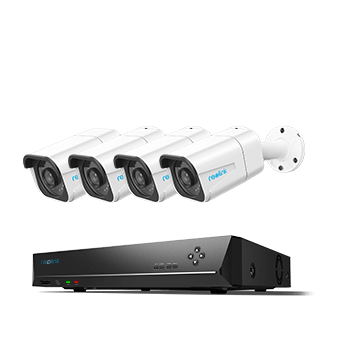
4K 8-Channel PoE Security System
4 pcs 4K Ultra HD Security Cameras; 2TB HDD 8-Channel NVR for 24/7 Recording; Person/Vehicle Detection; Plug & Play; 2 Network Solutions.
5. Best Enterprise 16-Channel System: Reolink RLK16-1200D8-A
Ideal for large retail stores, supermarkets, multi-building industrial facilities, and expanding enterprises.
Large businesses require high-density coverage, advanced deterrence, and centralized storage to handle dozens of high-resolution video streams simultaneously.
Key Commercial Features:
-
12MP Ultra HD & Dome Design: Includes eight vandal-resistant 12MP dome cameras (4512x2512) that capture extreme detail across wide open spaces.
-
Advanced Business Analytics: Features built-in AI analysis to track customer foot traffic patterns and Perimeter Protection (line-crossing and zone intrusion alerts).
-
Scalable 16-Channel NVR: Includes a 4TB pre-installed HDD (expandable up to 16TB) to manage 16 PoE streams simultaneously with zero monthly subscription fees.
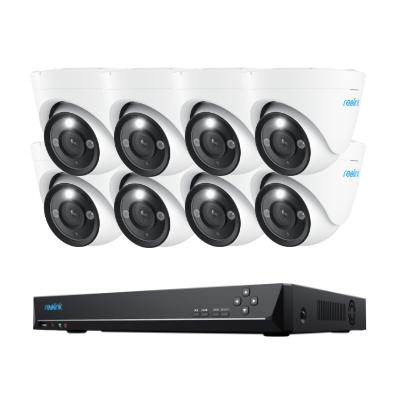
12MP PoE Security System with Color Night Vision
12MP Ultra HD, Person/Vehicle Detection, Power over Ethernet, 16-Channel NVR.
Business Security Camera & System: Installation, Placement and Costs
After you've purchased the best big and small business security cameras, the next step is to install them.
Installation Cost: Company vs. DIY?
If you want to hire a company to do the installation job, the security camera installation cost would be a great budget.
Typically, the 3-4 CCTV outdoor security camera system full setup and installation costs around $1,000, including security camera installation labor cost, while 8 security camera system installation fees may cost $3000-$4000.
That's why those DIY plug-and-play commercial quality security cameras are a better option. You don't need to spend extra fees on hiring installation companies, which saves your budget greatly.
High-Priority Placement Zones
Position cameras to capture critical high-risk zones, customer transition points, and high-value physical assets:
-
Primary Points of Entry & Exit: Monitors foot traffic, delivery drivers, and unauthorized visitors entering or exiting building doors.
-
Point-of-Sale (POS) & Reception Desks: Captures detailed transaction records, cash handling, and register activity.
-
Workspaces & Inventory Rooms: Monitors employee productivity, high-value asset storage, and supply rooms.
-
Warehouses & Loading Docks: Tracks inventory shipments, heavy equipment operation, and workplace safety compliance.
-
Parking Lots & Perimeter Fences: Provides long-range monitoring over exterior spaces, employee vehicles, and back alleys.
Legal Compliance & Privacy Boundaries
Business video surveillance is strictly limited to public and common operational areas where individuals have no expectation of privacy.
Audio recording laws vary significantly by region—many jurisdictions mandate explicit two-party consent or posted signage before recording conversation audio. Never record in private spaces, as doing so can invalidate footage in court and incur criminal penalties.
Prohibited Installation Zones:
-
Restrooms and changing facilities
-
Employee locker rooms and dressing areas
-
Private breakrooms or spaces with a reasonable expectation of privacy
What Business Owners Need Most from Security Cameras and Systems? (Real-World Insights from Reddit)
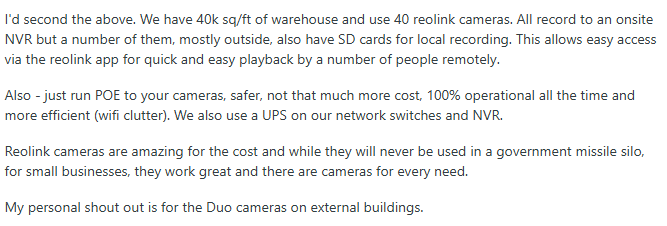
Business owners on Reddit consistently prioritize reliability and ease of management over flashy AI features. Whether running a retail shop, warehouse, office, or restaurant, most users are looking for a surveillance system that records continuously, provides clear evidence, and requires minimal maintenance.
1. Reliable 24/7 Recording Is the Top Priority
The most common requirement is continuous recording, especially after business hours. Owners don't want to miss incidents because of motion-only recording.
Business owners frequently mention the need for:
- 24/7 video recording
- Live remote viewing
- Night vision for after-hours monitoring
- Motion detection for quick event review
One business owner looking for a 4–5 camera system specifically listed 24/7 recording, live viewing, night vision, and motion detection as the essential requirements.
2. Local Storage Is Preferred Over Cloud-Only Solutions
Many small businesses don't want monthly subscription fees or to rely entirely on internet connectivity.
Reddit discussions show owners prefer:
- NVR-based recording
- Local hard drive storage
- Continuous recording even during internet outages
- Easy playback when reviewing incidents
For retail stores and warehouses, users often recommend an NVR with PoE cameras, noting that local recording is more dependable than cloud-only systems.
3. PoE Systems Are Recommended for Long-Term Reliability
Across warehouse and commercial discussions, experienced users generally recommend wired PoE cameras over battery-powered models.
Common reasons include:
- Stable network connection
- Continuous power
- Better support for 24/7 recording
- Less maintenance
- Easier expansion as the business grows
Even users initially interested in battery cameras were advised that PoE systems are the better long-term investment for business environments.
Why Reolink Is a Good Fit for Small Businesses
For small offices, retail stores, restaurants, and warehouses, Reolink PoE security systems address many of the concerns raised by business owners on Reddit by offering:
- 24/7 continuous recording with PoE cameras and Reolink NVR
- Up to 16MP Ultra HD resolution for capturing clear evidence
- Smart person, vehicle, and animal detection to reduce false alerts
- Local storage with no mandatory subscription
- Remote live viewing through the Reolink App and Client
- Scalable systems that support adding more cameras as your business expands
These features make Reolink a practical solution for businesses that need dependable surveillance, straightforward management, and long-term value without recurring licensing fees.
Business Security Camera & System Buyer’s Decision Table
To make it easier to sort through your options and compare choices with confidence, use this decision matrix to match your property layout to the ideal setup:
FAQs
What Is the Best Security Camera for a Small Business?
A PoE security camera system with an NVR is often the best choice for small businesses because it supports stable connections, 24/7 recording, local storage, and remote viewing. Look for 4K video, smart detection, night vision, and no required subscription.
Is It Legal for an Employer to Watch You on Camera All Day?
In many places, employers may use workplace cameras for security, but they generally cannot record private areas such as restrooms or changing rooms. Notification and audio-recording rules vary, so businesses should check local laws.
What Security Cameras Do Professionals Use?
Professionals commonly use wired PoE cameras connected to an NVR. These systems offer reliable continuous recording, high-resolution video, night vision, remote access, and easier multi-camera management.
How Much Does a Business Security Camera System Cost?
A small 4–8 camera system typically costs around $500 to $1,500, while larger systems can cost several thousand dollars. Installation, cabling, storage, and subscription fees may increase the total cost.
Conclusion
With versatile business security cameras and systems installed in your commercial buildings, you can check whether everything is alright by a tap on your smartphone, and get instant alerts if any dangers happen. With our list, no matter what types of commercial CCTV surveillance cameras you want, WiFi cameras or PoE types, you'll get the best one within minutes.
If you have any questions about business security cameras, please leave them in the comment below. We are always here to help!
Search
Subscribe for the Latest Updates
Security insights & offers right into your inbox