
Alexa Doorbell Cameras - The Best Picks and Setup Guide
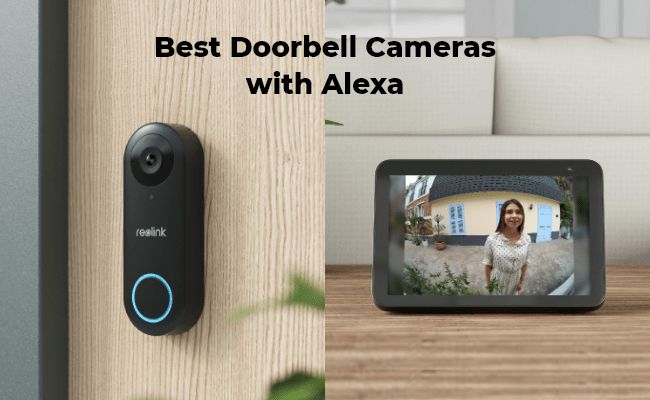
An Alexa doorbell is a video doorbell that works with Amazon Alexa, allowing you to monitor your front door and control certain functions through Alexa-enabled devices. Like traditional doorbell cameras, Alexa-compatible doorbells capture activity around your doorstep, but they add hands-free control through voice commands, allowing you to view live footage, receive alerts, or communicate with visitors without using your phone.
Alexa-compatible doorbell cameras are becoming increasingly popular for smart home security because they combine front-door monitoring with convenient voice control. In this guide, we’ll explore how Alexa doorbells work, the benefits of using a video doorbell with Alexa, the best video doorbells, and how to connect your doorbell camera to Alexa.
- Do All Video Doorbells Work With Alexa?
- Advantages of Alexa Doorbells for Home Security
- How To Choose A Reliable Alexa Doorbell Camera?
- Best Reolink Alexa-Compatible Doorbell Cameras
- How to Set Up Your Doorbell Camera for Alexa
- Tips For Using Your Doorbell Camera With Alexa
- Common Alexa Doorbell Issues And Troubleshooting Tips
- FAQs
- Conclusion
Do All Video Doorbells Work With Alexa?
No, not all video doorbells work with Alexa. A doorbell camera must support Alexa integration through an Alexa Skill or smart home connection to connect with Alexa-enabled devices. Compatible doorbells allow users to view live video, receive visitor alerts, and control certain functions through Alexa voice commands.
When choosing an Alexa-compatible doorbell camera, check whether it supports:
- Alexa Skill integration
- Live view on Alexa-enabled screens such as Echo Show or Fire TV
- Two-way audio through Alexa devices
- Smart home routines and voice control
Many popular video doorbells support Alexa, including Ring, Nest, Arlo, Eufy, and Reolink. However, compatibility features can vary by model, so users should check the product specifications before purchasing.
Advantages of Alexa Doorbells for Home Security
Here are some of the benefits you can expect when using Alexa-compatible doorbell cameras:
- Monitor your property via Alexa-enabled screens: These doorbell cameras allow you to monitor your front door and surrounding areas from Alexa-assisted devices in real time, providing an extra layer of security to deter potential intruders.
- Two-way audio: Alexa-compatible doorbell cameras also often provide two-way audio, allowing you to communicate with visitors or delivery personnel even when you're not at the door.
- Hands-free control: Alexa integration allows for voice control, enabling you to check the camera feed or react to notifications hands-free.
- Integration with other smart home devices: Doorbell cameras compatible with Alexa can integrate with other smart home devices, such as smart locks, sensors, and thermostats, to create a seamless and convenient home security system.
How To Choose A Reliable Alexa Doorbell Camera?
1. Check Alexa Compatibility Before Buying
Choose a doorbell camera that supports Amazon Alexa integration and works with Alexa-enabled devices such as Echo Show or Fire TV. A reliable Alexa doorbell should support features like live view, voice commands, and smart home routines.
2. Consider Video Quality And Viewing Angle
A good Alexa doorbell camera should provide clear footage of visitors and activities around your front door. Consider factors such as video resolution, night vision, HDR, and viewing angle to ensure important details can be captured in different lighting conditions.
3. Look For Smart Detection Features
Smart detection helps reduce unnecessary alerts by identifying important events. Features such as person detection, vehicle detection, package detection, and motion alerts can make Alexa doorbells more useful for daily home monitoring.
4. Choose The Right Power And Installation Type
Consider your installation location and existing wiring before choosing a doorbell camera. Battery-powered models offer easier installation flexibility, while wired or PoE models provide a more stable connection for long-term use.
5. Consider Storage Options And Subscription Requirements
Check how the doorbell stores recordings before purchasing. Models with local storage options such as microSD cards, NVR, or Home Hub allow users to save footage without depending entirely on cloud subscriptions.
6. Check Two-Way Audio And Alexa Voice Control
A reliable Alexa doorbell camera should support clear two-way communication, allowing you to talk with visitors through the doorbell or Alexa-enabled devices. Voice control features can make checking the front door more convenient without opening an app.
Best Reolink Alexa-Compatible Doorbell Cameras
Reolink Video Doorbell (WiFi) – Best Overall Choice
Reolink Video Doorbell (WiFi) is a versatile choice for homeowners who want a reliable front door security solution. It delivers 2K+ 5MP video quality, wide viewing coverage, smart detection, and two-way audio to help monitor visitors and deliveries clearly. With support for 2.4GHz and 5GHz WiFi, local storage, and Alexa integration, it provides a flexible setup for everyday home security.
Best for: Homeowners looking for a feature-rich WiFi doorbell camera with flexible installation and storage options.
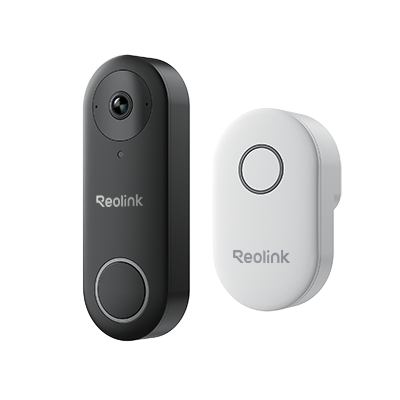
Smart 5MP Video Doorbell with Chime
5MP Super HD Day & Night, Person Detection, 2.4/5 GHz Dual-Band WiFi, 180° Diagonal Viewing Angle, Two-Way Audio, Rich Notification.
Reolink Battery Video Doorbell 2nd Gen – Best Battery-Powered Option
Reolink Video Doorbell 2nd Gen is designed for users who need flexible installation without existing doorbell wiring. With a long-lasting battery, 2K video quality, smart detection, package detection, and two-way communication, it provides reliable doorstep monitoring while reducing the need for frequent charging. Its Alexa compatibility also allows users to connect the doorbell with Alexa-enabled devices for hands-free control.
Best for: Homes, apartments, or rental properties that need easy installation, long battery life, and flexible placement options.
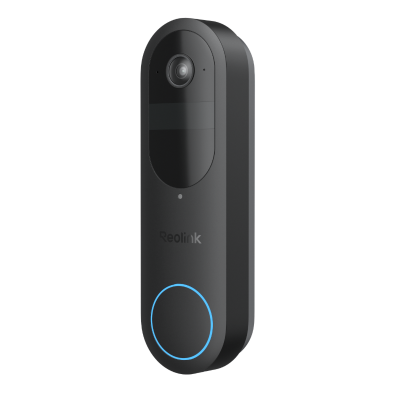
2K Battery Wi-Fi Video Doorbell with Smart Detection
- 2K 4MP Head-to-Toe View
- Person/Vehicle/Animal/Package Detection
- 300-Day Lasting Battery Life
- No Monthly Fees for Local Storage
How to Set Up Your Doorbell Camera for Alexa
Setting up your doorbell camera for Alexa can vary depending on your specific device. The guide below is for Reolink cameras:
- On your Reolink App, find the Smart Home option.
- Next, select the device you want to add to Amazon Alexa.
- Launch the Amazon Alexa App and tap on Devices in the bottom right corner.
- Select Your Smart Home Skills and tap Enable Smart Home Skills. Tap the Search icon in the top right corner and search Reolink Smart Home.
- Tap Enable to Use and log in to your Reolink account on the next screen. After logging in successfully, the App will remind you that Reolink Smart Home has been successfully linked. Tap CLOSE to proceed.
- Tap on Discover Devices. Alexa will scan and show the devices linked to your Reolink account. Select the doorbell camera.
- Tap on Set up Device, and make your preferred adjustments. Tap on Continue to finish the setup.
Remember, the specific steps for setting up your doorbell camera with Alexa may vary depending on the manufacturer and device you have.
If you are not using a Reolink doorbell camera, refer to the manufacturer's instructions for more information.
Tips For Using Your Doorbell Camera With Alexa
Alexa integration makes a doorbell camera more convenient by enabling hands-free control, live viewing, and smart home automation. Here are some practical ways to get more from your Alexa-compatible doorbell camera.
Voice Commands For Controlling Your Doorbell Camera
With Alexa voice commands, you can control your doorbell camera without opening the app. Common commands include:
- “Alexa, show me the front door.” – Display the live feed from your doorbell camera on Alexa-enabled screens such as Echo Show or Fire TV.
- “Alexa, answer the front door.” – Communicate with visitors through your doorbell camera using two-way audio.
- “Alexa, show me the front door camera.” – Quickly check who is outside using voice control.
These hands-free features are especially useful when you are cooking, carrying items, or unable to access your phone immediately.
View Your Doorbell Camera On Alexa Devices
If you have an Alexa-enabled device with a screen, such as Amazon Echo Show or Fire TV, you can view your doorbell camera’s live feed through voice commands. Simply say “Alexa, show me the front door” to check visitors, deliveries, or activity around your entrance without using a smartphone.
Connect Your Doorbell Camera With Smart Home Devices
Alexa-compatible doorbell cameras can work with other smart home devices through Alexa routines. For example, you can set outdoor lights to turn on when motion is detected or create automated actions when someone presses the doorbell.
By connecting your doorbell camera with Alexa and other compatible devices, you can create a more convenient smart home security system.
Common Alexa Doorbell Issues And Troubleshooting Tips
When using a doorbell camera with Alexa, you may encounter issues related to connectivity, subscriptions, privacy, or device setup. Here are some common problems and solutions:
Alexa Cannot Connect To The Doorbell Camera
Make sure your doorbell camera is properly set up and connected to WiFi. Check that your Alexa-enabled device uses the same network, then restart both devices if needed. Updating the doorbell firmware and Alexa app can also help resolve connection issues.
Doorbell Camera Requires A Subscription For Features
Some doorbell cameras require monthly subscriptions for features such as cloud storage or advanced functions. However, Reolink doorbell cameras support key features without mandatory subscription fees, with storage options including local storage through microSD cards, NVR, or Home Hub.
Privacy And Security Concerns
Since doorbell cameras record video and audio around your home entrance, privacy can be an important consideration. Choose a doorbell camera with secure connections and reliable storage options to better protect your recordings.
Alexa Doorbell Connection Or WiFi Issues
WiFi doorbell cameras may experience connection problems if the signal is weak or the camera is installed far from the router. For users who need a more stable connection, a PoE doorbell camera can provide a more reliable wired connection through an Ethernet cable.
FAQs
1. Can I use Alexa as a doorbell?
No, Alexa itself cannot replace a traditional doorbell, but it can work with an Alexa-compatible video doorbell to provide smart door access features. When connected to Alexa-enabled devices like Amazon Echo Show or Fire TV, you can view live footage, receive visitor alerts, and communicate with visitors through voice commands. Alexa works as a smart control hub, while the doorbell camera captures video and handles detection.
2. Which doorbell works best with Alexa?
The best Alexa-compatible doorbell should provide reliable Alexa integration, clear video, smart detection, two-way audio, and flexible storage options. Reolink video doorbells work with Alexa-enabled devices, allowing users to view live footage, receive alerts, and control their doorbell through voice commands. With features such as high-quality video, smart detection, local storage options, and no mandatory subscription fees, Reolink offers a flexible choice for homeowners looking for a reliable Alexa doorbell solution.
Conclusion
Video doorbells are great for your home security system and are even better when integrated with Alexa. With so many options on the market, it’s essential to consider factors like video quality, ease of installation, and compatibility with Alexa.
By doing so, you can choose the best Alexa doorbell cameras for your needs and enjoy the convenience of controlling your security system with your voice.
If you have any questions or comments about video doorbells or Alexa integration, please leave them below. And don’t forget to share this article with others who might find it helpful.
Search
Subscribe for the Latest Updates
Security insights & offers right into your inbox